


Showing posts with label Articles. Show all posts
Showing posts with label Articles. Show all posts
You may get call from Facebook if profile identity is suspect

Social networking giant Facebook is making a "huge effort" to weed out fake profiles to prevent misuse of such identities, a senior company official has said.
"Absolutely, there is a huge effort," Facebook India business manager Pavan Varma told PTI when asked about the company's action on this front.
If Facebook doubts the ownership of an account, it will ask the user to identify himself/herself, he said.
The doubt about the authenticity of the account will arise if an account has a generic name instead of a proper name, uses images of celebrities/ cartoon characters as display pictures, or does not have "enough friends", Varma said.
"It could even be that Facebook comes back to you saying, `could you help us identify yourself if you don't have enough friends, because we don't want fake identities," he said.
"We are worried about the experience we deliver....It's not about protecting our brand identity so much," he said.
Recently there were reports of fake accounts being created by computer programs, which are used for inflating the number of "likes" on Facebook page for a brand.
Facebook had recently said it would be taking out fake "likes" generated by spammers, malware and black marketers.
Varma said advertisers must also shed the obsession with numbers. "How does an advertiser today treat a Facebook page? It is treated as a place where they just come with a number of people who are there. But that is a wrong way of doing it," he said, stressing that the conversations around the brand should assume importance rather than the numbers.
Mere "likes" on the page do not help a brand, he said. Companies generally pay Facebook for a dedicated page on its platform that helps them connect with the target audience.
IDBI Bank claims it has over five lakh fans on Facebook, Varma said, who was speaking to PTI on the sidelines of a banking summit.
He added that Facebook, as a medium, is completely secure and cited the case of ICICI Bank, which now offers basic services over the Facebook page by integrating its net banking platform with the social networking site.
Report: More fixes for overheating iPads?

Apple is quietly revising its third-generation iPad in a number of ways to fix an overheating issue with the tablet, according to Digitimes.
The Taiwanese tech site reported Friday that Apple is switching out the third-gen iPad's dual-LED backlight module for a single-LED module like the one used for the iPad 2. That report comes on the heels of a Digitimes report from a day earlier that claimed Apple was upgrading the battery in its new iPad, also to deal with the overheating problem.
Both reports cited unnamed sources in the Asian electronics supply chain. The rumored revisions to the third-gen iPad will appear in models made available around the holidays, Digitimes reported. The iPad's overheating issues have been well-documented. Days after Apple released its third-gen iPad, Dutch site Tweakers.net published thermal images that it said showed the new iPad running 10 degrees hotter than the iPad 2. Using an infrared camera, Tweakers measured the temperature of each tablet side by side after five minutes of running GLBenchmark and found that the new iPad hit 33.6 degrees centigrade (92.5 Fahrenheit) while the iPad 2 ran at a cooler 28.3 degrees centigrade (82.9 Fahrenheit). Apple told All Things D that the new iPad runs "well within our thermal specifications."
If Digitimes' sources are correct, Apple is tackling the overheating issue on several fronts. First, there's the reported revision to the battery, which would make the tablet "slightly lighter and thinner than previously designed," the site reported. The third-gen iPad's second LED is apparently also a contributing factor to the tablet running hotter than Apple would like. Luckily for the iPad maker, returning to the single module design "will not affect luminosity and clarity of Apple's Retina Ddsplay," according to Digitimes' sources. Finally, the touch-screen panel on the revised iPad will utilize Sharp's indium gallium zinc oxide (IGZO) panel technology, Digitimes said, citing the Chinese-language Apple Daily site. That will allow for a thinner profile for the revised tablet and, somehow, "longer battery life," according to Apple Daily. It would also mean Apple is switching from its current panel supplier, Samsung, to Sharp. As always, Apple product rumors should be taken with a grain of salt
Devices connected to internet set to reach 15 billion by 2015

Devices connected to theinternet will reach 15 billion by 2015 and later to 50 billion by 2020, Indian Institute of Technology, Hyderabad Director Professor U B Desai said today.
"Coming together of web technologies, mobile computer and communication technologies have greatly enhanced the capabilities of global reach even for the common man, opening several opportunities and possibilities for better living," he added, at a two-day national conference on 'Advanced Communication and Computer Technologies, organised by the Institution of Electronics and Telecommunication Engineers (IETE), Visakhapatnam centre at the National Science and Technological Laboratory (NSTL) here today.
IETE president R K Gupta highlighted the role played by his organisation in reducing the digital divide by bringing together students, practicing professionals and industry.
IETE chairman, Visakhpatnam centre and Director NSTL S V Ranga Rajan said that 110 papers were shortlisted out of 160 papers presented by delegates in the area of communication technologies, image processing, microwaves and antennas, embedded systems, radar and sonar signal processing and others.
"Coming together of web technologies, mobile computer and communication technologies have greatly enhanced the capabilities of global reach even for the common man, opening several opportunities and possibilities for better living," he added, at a two-day national conference on 'Advanced Communication and Computer Technologies, organised by the Institution of Electronics and Telecommunication Engineers (IETE), Visakhapatnam centre at the National Science and Technological Laboratory (NSTL) here today.
IETE president R K Gupta highlighted the role played by his organisation in reducing the digital divide by bringing together students, practicing professionals and industry.
IETE chairman, Visakhpatnam centre and Director NSTL S V Ranga Rajan said that 110 papers were shortlisted out of 160 papers presented by delegates in the area of communication technologies, image processing, microwaves and antennas, embedded systems, radar and sonar signal processing and others.
Ice Cream Sandwich is the third favorite flavor of Android

Although Google continues to make improvements to its Android mobile operating system, users of devices designed to run it are still a few steps behind. According to the latest stats released by the search engine giant, only 10% of Android device owners are running version 4.0 of the software, also known as Ice Cream Sandwich.
The most-used variant, Gingerbread (Android 2.3), was released in December 2010 and has an install base of 64%. After that is Froyo (Android 2.2) at 17.3% and Eclair (Android 2.1) at 4.7%. Ice Cream Sandwich debuted in October 2011 on the Samsung Galaxy Nexus and, according to Google, is compatible with any device that's able to run Gingerbread.
That said, there's a good reason why all those devices that should be able to run it aren't:fragmentation. Hardware manufacturers actually need to tweak Android releases in order to make them work with each individual device, which means that older handsets and tablets are pretty low on their priority lists. What's more, cellular carriers have to agree to roll out each version of Android to each device individually. Time will tell if Android 4.1, aka Jelly Bean — which made its debut on the new Nexus 7 tablet from Google — fares better in this regard than its frozen-snack-themed predecessor.
IBM, SAP Now Support Microsoft‘s Standardization Move

Nearly six years ago one of the most bitter standards battles in all of computing was fought between OASIS, caretaker of the OpenDocument format, and Microsoft. The issue was whether, by making the document formats for Microsoft Office available as open standards, the company was unfairly leveraging Office's broad base of installation to unseat its only real competitor, the storage format behind OpenOffice.
That year, 2006, marked the turning point in Microsoft's public stance towards openness and interoperability. This despite bitter opposition led by IBM, which was working to resurrect the Symphony brand it had acquired through Lotus. IBM argued that Microsoft was undermining the standards process to suit its purposes. Just how much the computing environment has changed since then was made evident today as IBM (whose heart grew three sizes this day) joined with SAP and Citrix in backing a move by Microsoft to declare the OData HTTP-based database interaction prototol - also known as Open Data Protocol - an OASIS standard.
"OData is an application-level protocol for interacting with data via RESTful Web services," reads a white paper on an OData extension for XML published by OASIS (PDF available here). "An OData Service’s contract is defined by simple, well-defined conventions and semantics applied to the data model exposed by the service, providing a high level of semantic interoperability between loosely coupled clients and services."
Phrasing data in XML, ATOM or JSON format does allow it to be visible to many different database engines. They can see data in these formats, so that's not the problem. Essentially, how does a Web client (any browser on any device) request data from any server (any database engine or framework), and then initiate a dialog with that server so it can update or change one or more records? Remember, HTTP is a stateless protocol: Clients make GET requests and the occasional POST statement, and servers acknowledge and, when they can, comply.
So OData enables communication using any of these three formats for data expression, setting up the mechanism for clients to authenticate themselves and enter into a secure dialog. It already works. And as IBM discovered two years ago, OData was pretty much the only way of creating a single Web client for WebSphere data that worked with .NET, AJAX and PHP clients.
While an XML document contains the body of data, expressed explicitly within the markup, OData expresses the schema - the arrangement and relations between data in a database. It also allows for vendor-specific properties that enable features that one vendors database might utilize while another's does not, though these properties are typically flagged within the metadata using obvious vendor-specific tags; for example, sap:filterable.
Writing on behalf of the OData organization today, Microsoft's senior program manager for OData Alex James said today, "With interoperability front and center in OData we saw more and more technology stacks that started to work with it. Now there are a number of companies that use OData in their products to ensure the data they manage is easily accessible beyond the boundaries of their applications. Many of these companies regularly collaborate on the ongoing design effort for OData. While so far we’ve run the OData design process as transparently as we could (sharing designs, taking feedback through the odata.org blog and distribution list, etc.), we are at a point where the level of adoption and the scale at which organizations are betting on OData require a more formal commitment to shared ownership of the design of this protocol."
It’s tempting to draw the conclusion that Microsoft and IBM are “joining forces,” in coalition against a common enemy. The facts are more economic than melodramatic: Waging platform wars, especially over something that should be as ubiquitous as data exchange, costs way too much money. While the Open Office XML/OpenDocument fracas generated plenty of headlines and even sparked a few campaign rallies, it was a drain on both sides’ resources at a time when the platforms supporting both standards – client-side applications – were starting to become obsolete anyway. The fact of the matter is, OData works, and creating a competing format just to rally the troops and produce headlines is a waste of time and money. It’s best that companies pick their battles more wisely. What’s more, IBM, Microsoft, and SAP alike have come to the realization – perhaps a mutual one – that the best platforms are never islands unto themselves
Microsoft wins ruling against Motorola over texting

A German regional court ruled in a hearing on Thursday that Motorola Mobility(GOOG.O) infringed Microsoft(MSFT.O) patents by offering the option on its mobile phones to send a longer text in a batch of several messages.
"We're pleased the court agreed today that Motorola has infringed Microsoft's intellectual property, and we hope Motorola will be willing to join other Android device makers by taking a license to our patents," Microsoft said in a statement, referring to Google's Android operating system for mobile phones.
Motorola, which was recently bought by Google, said: "We expect a written decision from the court on June 1 and upon review, will explore all options including appeal."
The two companies are fighting each other in courts across the globe, as are several other makers of devices including Apple (AAPL.O), over the intellectual property of software features offered in the latest smart phones and gadgets.
In another case, the same regional court in the city of Munich on Thursday rejected a complaint by Microsoft against Motorola Mobility's use of a software feature called programme localisation.
Motorola Mobility, in turn, is currently suing Microsoft in the U.S. over features in the Xbox gaming console.
When Facebook Apps cease to be ‘Cool’

Articles
Have you ever wondered why certain ads show up in the right hand corner of your Facebook page? A closer look at these ads and you will be surprised at the volumes they speak about your lifestyle choices – be it exclusive shoes from an e-retailer or a self-development course! How does it all happen?
The Unique Facebook ID (UID) is a number assigned to each user – this being the most public part of the Facebook profile. Anyone with a browser can look up a person’s name with the UID even if that profile is set to be private. For others, it reveals all the information they have set to share with “everyone” like, age, occupation, photos, location etc.
Apps are considered to be an important way for Facebook to extend the utility of its network and converting it into a hub of activity. They are also a growing source of revenue beyond advertising for Facebook itself.
Here are a few examples to help you understand the working of the apps and how your information is used.
- Applications like FarmVille or Texas HoldEm Poker when given access to, request for permissions and data elements like your friends’ data (email address, current location, sexual preference, status updates, birthdays etc.) So even if you never connect your Facebook account to a single app, dozens of them may still have access to your profile information via your Facebook friends.
- When you keep your location up-to-date on Facebook it just gets scarier with the “Maps” feature which can be used for geotagging. It gathers data from a user’s location like, IP address, location, type of browser used or pages visited. This data is collected, even when a friend has GPS on and tags you in a photo that is being uploaded from a mobile phone.
- If you have to you have to RSVP on Facebook to an ‘Invite’ for a party or an event hosted by your local club and you click “Attending”, your plans are aired to your entire network – whether you realise it or not! “Sponsored Stories” are an effect of your ‘RSVP’ activity. Every time you like a brand or respond positively to a public event, companies can let your friends know that you are attending an event with hopes of getting a positive response from them too. Your information thus becomes available for brand ambassadorship!
- You find that your friend has read an article that interests you through the Washington Post Social Reader. The moment you click that link, the app requests for permission before reading the article. The working of this app doesn’t require for prompts before sharing the activity. So once you start clicking, your activity is reflected on others mini-feed. Thus, even without direct access your reading habits are exposed for anyone to access.
- You have given access to “My Calendar Birthdays” and you have liked your bank’s Facebook page. Under your Facebook list of family members is included your mother, whose profile is searchable under both her maiden and married name.
This provides ample opportunity for the data brokers to gather data from Facebook profiles and compare it with public browsing habits, creating a mine of data that can give any ad firm or a cyber crook a field day!
How do you prevent this? Have extremely conservative privacy settings – remove applications that you don’t use and edit the settings for the ones that you do. If any application requests for data that you are not comfortable sharing revoke that access. If access is required for that app, remove it. You can also have Internet Security software with parental control features would allow or block access to only specific sites.
In the attempt to have an overly social experience of making the world a smaller place to live in, what we have actually ended up with is, a situation where the boundary between what is sacredly private and personal and what is public, is heavily blurred. A situation that demands users to be educated on the implications of privacy policies and what it means to make personal information public.
Five Best Android Phones
There are dozens—probably hundreds—of Android phones on the market today. Some of them are exclusive to specific carriers, some of them are available around the world, but only a few of them are at the head of their class. This week we wanted to know which Android phones you thought were the best available, not just because they round out a checklist of features or high-end hardware, but because you think they offer a great overall experience. Here's a look at the top five Android phones.
There are plenty of sites willing to tell you which phones are the best based on the chips inside, the camera, the storage, or the version of Android pre-installed, but those things don't always add up to a great user experience. and here's the Highlight to our Top 5 Hive Five android phones:
 Samsung Galaxy Note
Often referred to as a "phablet" because of its included stylus and massive 5.3" Super AMOLED display, the Samsung Galaxy Note (AT&T, $299 w/contract) is huge, but many of you praised it for blending the portability of a phone with some desperately needed tablet-like real estate. The 8MP and 2MP rear and front-side cameras and 1.4GHz dual core processor don't hurt matters either, and while it's definitely not the right size for everyone, those of you who have one love it, and others are looking forward to its release on other carriers. Plus, even though the Galaxy Note ships with Android 2.3 Gingerbread pre-installed, there are plenty of ROMs available to bring it up to Android 4.0 Ice Cream Sandwich, or just replace Samsung's TouchWiz interface entirely.
 HTC One X/S
The HTC One series is HTC's most recent attempt to recreate itself, not that the company really needed to—most people who have used HTC devices love them, and the HTC One X and One S are no exceptions to the rule. The One X (AT&T, $199 w/contract) is HTC's new flagship phone, sporting a 4.7" screen, a quad-core NVidia Tegra 3 (internationally) or a dual-core Qualcomm Snapdragon (US/Canada) processor, Android 4.0 Ice Cream Sandwich (with HTC's Sense UI on top), built-in Beats Audio, and an 8MP rear camera with a 1.3MP front-facing camera. The HTC One S (T-Mobile, $189 w/contract) on the other hand is a slightly smaller 4.3" screen, a 1.5Ghz dual core processor, 8MP rear and VGA front cameras, Beats audio, and Ice Cream Sandwich. Both devices are slim, powerhouse devices designed to bring Android lovers' focus back to a select group of high-end HTC devices, instead of the dozen-plus ones HTC has released in the past. So far, it's working.
 Samsung Galaxy S/S II
The Samsung Galaxy S series of devices are some of the most popular smartphones in the world, and even though Samsung and Apple are embroiled in a patent lawsuit over exactly how similar the Galaxy S is to the iPhone (and vice versa), that hasn't stopped the Galaxy S and the Galaxy S II from selling millions of units worldwide. The Galaxy S was one of the first dual-core Android smartphones, and definitely one of the first to feature Samsung's new (at the time) Super AMOLED display, offering bright and crisp colors even in bright light. It's still available for a song depending on the carrier you pick it up from (in the US, it was sold under the name Vibrant (T-Mobile), Captivate (AT&T), Fascinate (Verizon Wireless), and Epic (Sprint) in both 3G and 4G variants.) History aside, the Samsung Galaxy S II is the company's current model and features a 4.3" Super AMOLED display, a 1.2GHz dual core processor, and while it shipped with Android 2.3, most carriers have been slowly rolling out updates to bring the device up to Android 4.0. Pricing varies depending on the carrier and variant you pick up, but one thing is certain: when it was launched, most people considered the Galaxy S II the best Android smartphone—if not the best smartphone—available on the market, which makes the furor over the upcoming Samsung Galaxy S III that much louder.
 Droid Series by Motorola
The Droid by Motorola (Motorola Milestone, internationally) series was one of the earliest Android phones on the market to really bring Android to the masses—and definitely the first Android phone available on Verizon Wireless at the time. It was a tough call to group the Droid series together, but it's worth noting that those of you who nominated the Droid line in large numbers specifically mentioned the slider models, not the candybar models like the Droid Razr, Razr Maxx, or the Bionic (although they all got strong nominations as well)-all available on Verizon Wireless in the US. The Motorola Droid 4 (VZW, $199 w/contract) is the current iteration of the phone, featuring a 4" qHD display, a 1.2GHz dual core processor, 8MP rear and 1.3MP front-facing cameras, and most notably, a slide-out backlit keyboard that allows the phone to be used in both portrait and landscape modes without sacrificing screen real estate. The Droid line is still one of the few high-end Android devices to feature a physical keyboard, making it popular for both portability, and with people who prefer physical keyboards to on-screen ones. The Droid 4 sports Android Gingerbread, and rides Verizon Wireless' 4G network.
 Samsung Galaxy Nexus
The Samsung Galaxy Nexus (VZW, Sprint, $199/w contract, $399 unlocked) is the current official "Google Phone," having launched with Android 4.0 Ice Cream Sandwich and currently serves as the flagship Android device. It sports a 4.6" Super AMOLED display, a curved contour screen, a 1.2GHz dual core processor, and 5MP and 1.3MP rear and front-facing cameras. It's a pure Google experience, meaning the phone is (largely) free of bloatware and other apps pre-installed by carriers and manufacturers, and is notably missing Samsung's TouchWiz UI layer in favor of a clean version of Ice Cream Sandwich. The phone also sports Google's NFC payment system, Google Wallet. The camera boasts zero shutter lag, and it was the first phone to launch with Ice Cream Sandwich pre-installed, and it's still one of the few devices you can get that already has it. If you want the more true and pure Android experience possible, or want an Android phone that's officially supported by Google, this is it.
Remember, the top five are based on your most popular nominations from the reviews based on different sites. If there's something you want to add, Share your thoughts in the comments below.
Apple is 10 years behind Microsoft on security, expert says

Articles
Apple may be the most valuable company in the world, but when it comes to security, the Cupertino-based company doesn’t hold a candle to Microsoft. Kaspersky Lab co-founder and chief executive Eugene Kaspersky on Wednesday told CBR that Apple is a decade behind Microsoft in terms of computer security.
"I think they are ten years behind Microsoft in terms of security,"Kaspersky said.
"For many years I’ve been saying that from a security point of view there is no big difference between Mac and Windows. It’s always been possible to develop Mac malware, but [Flashback] was a bit different. For example it was asking questions about being installed on the system and, using vulnerabilities, it was able to get to the user mode without any alarms.”More than 600,000 Macs were infected by the Flashback trojan virus before it was discovered earlier this month and the exploit it used to infect OS X PCs was patched.
“Apple will understand very soon that they have the same problems Microsoft had ten or 12 years ago,” Kaspersky said. ”They will have to make changes in terms of the cycle of updates and so on and will be forced to invest more into their security audits for the software.”
First Look at Ubuntu Linux 12.04 "Precise Pangolin"

News
Ubuntu 12.04 "Precise Pangolin" is out today, bringing lots of improvements to your favorite Linux distribution. It has a new quick search feature called the HUD, some new privacy settings, a few tweaks to the Unity interface, and more.
This release is another "Long Term Support" release, meaning Canonical will support it for longer than other versions—five years, to be exact. It also usually means lots of new features, though this time around it seems to be more polish than anything—though the HUD alone is reason enough to upgrade. Here's a look at everything that's new.
The HUD Makes Finding Menu Items Super Easy
 Have you ever been in a situation where you're using a program, and want to do something specific that you know is in the menus, but you just don't know where? The new HUD solves that problem. Just hit Alt, and a search bar will pop up in the upper left-hand corner of your screen. From there you can type in what you're looking for, and it will return any menu items that match your query. If you've ever used a Mac, it's almost exactly like the Spotlight bar you get under the "Help" menu of individual applications, and it is a lifesaver.
New Privacy Options Keep Your Information to Yourself
 One great thing about Unity's Dash is that you can search for recently used files, folders, and programs easily. However, if you'd rather some of your activity not be logged, Precise has a new set of Privacy options to let you tweak that. By going to System Settings > Privacy, you can now ignore certain types of files, ignore activity in certain folders, or ignore activity with certain applications. You can even turn activity recording off altogether if you'd rather not have the feature at all. In an age where everyone's having privacy gaffes left and right, it's nice that Canonical has added this easily accessible preference pane for anyone to tweak.
Miscellaneous Improvements in the Unity Interface
 Love it or hate it, Unity is here to stay, and the newest version has a few tweaks that make it a bit more appetizing to those of us on the fence. At the top of the list is a new Video lens in the Dash (remember lenses?), which searches not only videos on your computer but videos online. That means you no longer need to head to Amazon, Vimeo, or TED Talks in your browser to start searching for videos—just hit the Super key, click on the video lens, and start typing. Sadly, it doesn't search all of YouTube yet, just YouTube Movies and YouTube Shows, but hopefully this will change or someone will create an add-on in the future.
You'll also find that Nautilus now has a pretty beefy right-click menu in the Unity dock, which is nice, plus some nice color-matching effects if you have a powerful enough machine. The "Appearance" settings pane also has a few Unity-specific preferences, like auto-hiding the launcher.
Touchpads With Built-In Buttons Work a Tiny Bit Better
For a long time, Ubuntu has had trouble with ClickPad devices, where the touchpad itself is the mouse button (like those found on MacBook laptops). In Precise, ClickPad devices are now fully supported. Finally, you can click the button, but still move the cursor around with a second finger on the trackpad. In previous versions of Ubuntu, it had trouble recognizing the second finger. Unfortunately, trackpad support still really isn't there. While clicking and dragging mostly works, Canonical seems to have completely ignored regular mouse movement. If you have your thumb on the bottom of the trackpad, you can't move the mouse with a second finger. The whole thing still feels unnatural and unfinished. Here's hoping this will improve soon—at least we know they're now looking into it. Photo by Ryan Bailey.
Rhythmbox Is the Default Music Player Again
We really dug Banshee as the default music player in Ubuntu, but with version 12.04 they've defaulted back to the stable, popular Rhythmbox. The biggest change here is that the Ubuntu One Music Store is once again available in Rhythmbox, so Ubuntu One users are the only ones really affected—everyone else can continue using whatever music player they want.
Ubuntu One has a Few More Options
Lastly, Ubuntu One users will also find that the Ubuntu One client interface has changed a bit, and is now more similar to its Windows counterpart. You also have the option to choose which folders you want synced to your machine, which is nice.
Despite its being an LTS release, there aren't a ton of huge changes in Ubuntu 12.04, though the HUD is easily enough to get us upgrading as soon as possible. Check out Canonical's changelog for the full list of changes, or just download the new version now and try it out for yourself.
If you stumble on any new features you love, be sure to let us know about them in the comments.
How Google Searches the Entire Web in Half a Second

Articles
It only takes half a second for Google to return a search based on keywords you type in, but there’s a whole lot more happening behind the scenes to give you the results you need. Google on Monday launched a video that explains the science behind how the massive search engine actually works.
Matt Cutts, software engineer head of Google’s webspam team, details in a YouTube video how the search engine giant thoroughly scours the web on a daily basis to provide the most up-to-date results to users.
“There are three things you need to do to be the best search engine in the world. First, you need to crawl the web comprehensively and deeply, then you want to rank or serve those pages and return the most relevant ones first,” Cutts said.Although Google crawls the web on a daily basis, that wasn’t always the case.
“We used to crawl for 30 days… and then index for about a week and push that data out — and that would take about a week,” Cutts said. “Sometimes you would hit a data center with new data and sometimes you would hit a data center with old data.”But this method wasn’t optimized since a lot of the information would be out of date. In 2003, Google switched to crawling a significant amount of the Internet each day. By scouring the web each day for new content, it incrementally updated its index.
“We have gotten even better over time, and at this point, we can keep it very fresh,” Cutts said.To do so, page rank is the key deciding factor as to how likely you are to see a link: “We basically take page rank as the primary determinant and the more page rank you have — that is, the more people that link to you and the more reputable those people are — the more likely it is that we will discover your page relatively early in the crawl,” Cutts said.
Google also places a lot of emphasis on word order. For example, a search for pop singer “Katy Perry” will look for results with those two words next to each other, rather than having “Katy” and the word “Perry” show up in different parts of the content.
Finding the right balance between word proximity, page reputation and links pointing to it is the key.
“That’s kind of the secret sauce,” Cutt added.Google then sends that query out to hundreds of different machines all at once, which look through their fraction of the web that has been indexed to find the best match.
“We say, ‘what’s the best page that matches this query across our entire index?” Cutts said. “We take that page and we try to show it with a useful snippet, so we show the keywords in the context of the document and get it all back in under half a second.”How do you think companies can use this information to better show up in Google search results? Let us know your thoughts in the comments.
Source: Mashable
If MAC was the most popular OS in the world, Hackers would have bankrupted Apple!

"If MAC was the most popular OS in the world hackers would have bankrupted apple!"More than half a million Apple computers have been infected with the Flashback Trojan, according to a Russian anti-virus firm.
The report claims that about 600,000 Macs have installed the malware - potentially allowing them to be hijacked and used as a "botnet".
The firm, Dr Web, says that more than half that number are based in the US.
Apple has released a security update, but users who have not installed the patch remain exposed.
Flashback was first detected last September when anti-virus researchers flagged up software masquerading itself as a Flash Player update. Once downloaded it deactivated some of the computer's security software.
Later versions of the malware exploited weaknesses in the Java programming language to allow the code to be installed from bogus sites without the user's permission.
Remote control
Dr Web said that once the Trojan was installed it sent a message to the intruder's control server with a unique ID to identify the infected machine.
"By introducing the code criminals are potentially able to control the machine," the firm's chief executive Boris Sharov told the BBC.
"We stress the word potential as we have never seen any malicious activity since we hijacked the botnet to take it out of criminals' hands. However, we know people create viruses to get money.
"The largest amounts of bots - based on the IP addresses we identified - are in the US, Canada, UK and Australia, so it appears to have targeted English-speaking people."
Dr Web also notes that 274 of the infected computers it detected appeared to be located in Cupertino, California - home to Apple's headquarters.
Update wait
Java's developer, Oracle, issued a fix to the vulnerability on 14 February, but this did not work on Macintoshes as Apple manages Java updates to its computers.
Apple released its own "security update" on Wednesday - more than eight weeks later. It can be triggered by clicking on the software update icon in the computer's system preferences panel.
The security firm F-Secure has also posted detailed instructions about how to confirm if a machine is infected and how to remove the Trojan.
Although Apple's system software limits the actions its computers can take without requesting their users' permission, some security analysts suggest this latest incident highlights the fact that the machines are not invulnerable.
"People used to say that Apple computers, unlike Windows PCs, can't ever be infected - but it's a myth," said Timur Tsoriev, an analyst at Kaspersky Lab.
Apple could not provide a statement at this time
Source: BBC News
IIT responsible for Aakash (i)'s failure: Datawind

NEW DELHI: Six months after ministry of human resource development launched the Aakash tablet, barely a few hundred units have reached students. The manufacturing of the device has been stopped and now the ministry and Datawind, the company responsible for supplying the tablet, are focusing on Aakash 2, an upgraded version of the device.
Datawind concedes Aakash, which is supposed to digitize the way students study in India, has not been a success in its first version. But the company squarely blames IIT-Rajasthan, the nodal agency overseeing the project, for the fiasco. It says the concerns over the tablet's quality and functionality are overblown by the institute in a bid to "favour other firms".
Datawind's CEO, Suneet Singh Tuli, says that after winning the bid to manufacture Aakash, the company supplied 10,000 tablets to IIT-Rajasthan. They were part of an initial order of 1,00,000 tablets that Datawind was supposed to supply to the government at a price of $49.98 per unit. But after a few hundred tablets reached students as part of the pilot project, IIT-Rajasthan started rejecting Aakash tablet, allegedly after reports that the device was failing during pilot testing and did not meet the quality criteria set by the institute.
Tuli, however, disagrees. "IIT-Rajasthan was simply trying to defame us by saying that we could not meet the quality required by it," he says. "When we were awarded the contract, there was only a specification sheet. But when we started supplying the tablets, IIT-Rajasthan started rejecting the tablet based on biased and unscientific testing methodology. "
"IIT Rajasthan put up roadblocks. It jeopardized the whole project. I can say the dirty tricks by the institute put us around six months behind on the project ... they did it because they were favouring other firms... Even now, the institute is trying to sabotage the project," he adds.
There are reports that IIT-Rajasthan has been issued a showcause notice by MHRD last month over the Aakash failure. The notice asks institute to explain why it did not set up a tablet testing facility and procedure in time and why it failed to resolve its dispute with Datawind. Reportedly, the institute also worked with Wishtel, a company that launched a low-cost tablet called Ira last week. TOI tried contacting Prem K Kalra, director of IIT Rajasthan, over the email and phone but he wasn't available.
Datawind says that after the fiasco, it took back the tablets supplied to IIT-Rajasthan. "We have not been paid for a single one of them. But mission is more important to us... we believe in Aakash project," says Tuli.
The company is now working on Aakash 2, an updated version of the original tablet. It will have a capacitive screen instead of resistive and hence support multitouch. It will also have a better processor - based on Cortex A8.
"We are working with IIT Mumbai for Aakash 2 and will start supplying the tablet to government this month. Our original order for 100000 units has been transferred for Aakash 2 now. After the order of 100000 units is met, MHRD will invite bids for more tablets. We will bid again," says Tuli. Kapil Sibal, minister of human resources and development, on Tuesday said that Aakash 2 will be available in May.
Datawind also sells a commercial version of Aakash tablet called Ubislate. Tuli claims the firm has received over 3 million pre-bookings for Ubislate. However, this tablet too has not reached customers. "We are aware of the delay and trying to sort it out. We hope to ship Ubislate to consumer in next 10 days. To compensate for the delay, we will now give them Ubislate+, an upgraded version of the tablet at the same price," says Tuli.
Source: The Times of India
The Stupid Things You Do Online (and How to Fix Them)

Articles
The internet can bring you a lot of joy, but it can also turn into a world of pain the moment you make one stupid mistake. Perhaps you've been feeding the trolls, using "password" as your password, or selling your soul for access to a "free" web app. Your dumb mistakes can come back to bite you in the ass if you aren't careful. Here's how you can save yourself from yourself online.
Title image remixed from an original by Konstantin Maslak (Shutterstock).
Stupid Thing #1: You Undervalue Your Personal Data

Fortunately, you can have your cake and eat it too. If you don't like targeted ads based on your search history, you can just utilize your browser's Do Not Track options. Facebook now offers lots of ways to set the level of privacy you want to maintain, which is great, but with all the options it can be tough to learn and get just the way you want. Our always up-to-date guide to managing your Facebook privacy can get you up to speed. One of the first things you should do with Facebook is prevent apps from using your personal data as much as possible. Signing up for an app can provide the developers with much more information than you may realize as the apps will take information they don't necessarily need. To find out what each app is doing and limit its reach, just click the downward-facing triangle in the upper-right hand corner of your Facebook page and choose "Account Settings." From there click the Apps tab and click the "Edit" link next to any app. You'll see a list of what it is allowed to do plus the information it can access. Some stuff will be required for the app to function, but you'll almost always find something that isn't. Click the "Remove" link to revoke the app's permission to access that information.
Stupid Thing #2: You Submit Sensitive Information Over an Insecure Connection
 When you submit sensitive information—like, say, your credit card number or login credentials—over an insecure connection, it's not necessarily your fault. Web sites worth their salt need to use HTTPS, rather than HTTP, in order to transfer data securely between your computer and their servers. That said, you have to be diligent and look for https:// in the URL bar in your browser (see the image to the right for an example). If you don't see this, chances are you're just using standard HTTP.
This isn't a big deal if you're just reading or watching something, but if you don't see https:// you should avoid sending sensitive information like your credit card number or address. Also, the insecurity of HTTP isn't as big of a deal when you're on your password-protected home network, but when you're on a public Wi-Fi connection, anyone can snoop on what you're doing.
Stupid Thing #3: You Feed the Trolls
 When you feed the trolls—that is, the moment when you engage a malicious idiot in their hateful, annoying, and pointless discourse—you do everyone a disservice. You not only involve yourself in an almost endless, useless, and anger-filled debate, but you pollute the internet with hateful threads of garbage along with the trolls who start them. The internet is never going to vomit rainbows (at least not all of the time), but we can attempt to create happier, more pleasant communities by avoiding unwarranted fights and flame wars. Unfortunately, it's tough for a lot of people to get past a statement that incites anger but there are a few things that can help.
First, it's important to remember that trolls are not attacking you—they're attacking boredom. They have nothing better to do than say something mean so that's how they've unfortunately chosen to spend their time. If what they're saying isn't going to have much of an impact on anyone, just remember that they're bored, loathsome people and let it go. On the other hand, if they're promoting hate speech and potentially causing harm to others, it's best to avoid engaging them and instead report them to the site's administrator. Many sites offer a means of flagging harmful posts, and commenting systems offer ways for an administrator to ban problematic users. A simple email is often sufficient to take care of a bad person. Engaging with a troll-ish thread is just going to make you angry and potentially get you in trouble, too. If you do fall into the trap of feeding a troll, however, using the principles of cognitive therapy can be a worthy solution. This means responding positively and calmly, while accepting their different opinion. The trolls will likely find it frustrating and even condescending, but it's hard to argue with someone who is accepting your point of view (or even agreeing with you).
Stupid Thing #4: You Leave Private Information in Your Web Browser
 Nowadays we spend a lot of time in our web browser and that makes it a potential source for embarrassing personal information. If you keep yourself logged into accounts on your computer, anyone casually borrowing your browser for a quick search can stumble onto some pretty personal stuff without even trying. For anyone actually interested in snooping, your web browsing history is a prime target. Even a visit to Amazon can dig up weird products you looked at or even bought.
Keeping your browser activity private can be a lot of work, but there are a couple of things you can do to take the pain out of it. First of all, if you're doing anything particularly private on your computer you can just log out or lock people out with a password. Enabling a guest account can be very useful so when anyone wants to use your computer they won't be entrenched in your embarrassing web activity. If you don't want to password-protect anything, the next best thing you can do is just quit your browser whenever you're done using it and set it to clear your history when you do. On top of that, make sure you log yourself out of any accounts or your browser handles that for you. For the super paranoid, clear your cookies as well. One of our favorite tools for the job is CCleaner (the first 'C' stands for Crap), available for Windows and Mac.
CCleaner will give you a good start, but the fact of the matter is that a determined snoop has a ton of ways to spy on your browsing behavior.
Stupid Thing #5: You Don't Keep a Backup of Online Data
 You know backing up your computer is important because it's been hammered into your head by us and virtually everyone who knows a thing or two about computers, but somehow we tend to ignore the importance of online backup. Web services go offline all the time. Most recently, MegaUpload was seized by the U.S. government and now many people have lost their uploaded files. They may be filing a lawsuit to regain access, but the reality is they no longer have their data. You never know what's going to happen to your data, especially when it's out of your possession, so always keep at least one backup.
Some data, like photos and videos, can simply remain backed up on a local hard drive. If you lose your content online, you can always access a local copy and upload it elsewhere. That's all well and good if you create your content locally on your computer, but there is plenty you create online as well and that data is only saved on the server. In the case of Facebook, you can simply download all of your data in one big chunk. All you have to do is go into your account settings and look for the "Download a copy of your Facebook data" link at the bottom of the page. Not all web apps allow a full data download like Facebook, however, and you'll need to employ other services. InSync will handle your Google Docs. Backupify can back up multiple web services like Google Apps, Twitter, Facebook, and more. If you keep any vital data online, be sure you use something to back it up. If you don't, it could be gone tomorrow with no way to get it back.
Stupid Thing #6: Assuming Your Posts and Comments Are Anonymous

What you say online is going to be around for a long time, and when you do as much as post a comment on a popular site it's likely going to surface when someone does a web search for your name. I've commented on an article maybe three or four times in my life and this Steve Ballmer hate rant has managed to stick to my name since the day I was apparently so offended (which was over seven years ago).
It's not that it's impossible to comment anonymously online—and we've offered some tips for doing just that—but most of us don't follow a strict enough set of rules to remain anonymous. Even if you don't use your real name, comments stick. You'll probably use that pseudonym down the line and it will gain its own reputation. Your name may be tied to that pseudonym on as little as one web site and people will be able to find out who you are with a simple search. Additionally, you may post a comment on a blog or other page without realizing that you're already logged in via your Facebook account. There are a lot of ways your name can be tied to what you say online, so it's important to remember that your reputation is riding on every post to some extent. Remember to think about what you're going to say before you say it or it may follow you around for much longer than you expect.
Stupid Thing #7: You Let People Track Your Whereabouts
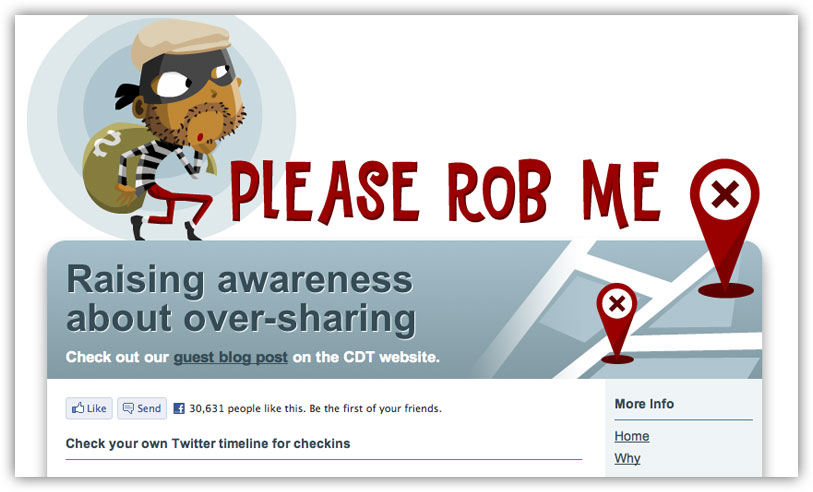 Checking in to sites like Foursquare, Gowalla, and Facebook is all fun and games until somebody loses an eye—or, well, any personal belongings that a thief can snatch while s/he knows you're out of the house. A web app called Please Rob Me demonstrates (with humor) how your check-ins can provide too much information regarding your whereabouts when you share publicly. All you really have to do to solve this problems is share privately. Most check-in sites have this option. Follow these instructions for Foursquare, simply become a private user on Gowalla, and if you're using Facebook you can just tag yourself at a location after the fact so your location isn't disclosed in real-time. That's really all there is to it. Be careful who you share your location with and you've fixed the potential damage.
Stupid Thing #8: You Use an Insecure Password That You Rarely (or Never) Change
 If you read Tech. In Total. with any regularity you know we love a good, strong password. That said, most people seem pretty reluctant to let go of their simple passwords in favor of something more complex. But you can have strong yet memorable passwords or just use a multiword phrase to decrease the chances of anyone ever hacking your password. Or better, yet, you can let a password manager like LastPass pick and remember your complex password for you. But anyone who's using a weak password at this point is likely doing it because they don't want to bother changing every password for every online service they've ever used. While that's understandable, you really just have to get off your butt and take care of it. Using a service like LastPass is a good option because it can save your existing passwords and automatically detect updates when your passwords change. This way you can change them at your leisure, whenever you log into a site with an old password, and make sure everything is still up-to-date and remembered by a password manager. (Consult this infographic for a condensed look at nearly every tip and method we've posted.)
Want to leave your suggestions? Drop them in the comment section below:
Popular Posts
-
 It's been about three years since Microsoft unveiled a new version of Office, and particularly with Windows 8 just months away from ...
 -
 There's general agreement that Sony stumbled out of the gate with the PlayStation 3. Months of intense hype were followed by a la...
 -
 Latest Windows Phone 8 rumor suggests that current Windows Phone devices will receive the update Microsoft has yet to come forward wi...
 -
Microsoft is holding an invitation-only press event in San Francisco today at which it is expected to debut the next version of its...
-
 Gaming & Gadgets Microsoft kick-started the "next-generation" of gaming on November 22, 2005, when the company release...

