


Showing posts with label Gadgets. Show all posts
Showing posts with label Gadgets. Show all posts
Microsoft Xbox One - One Size that Fits All Your Entertainment

It's been a long time since Microsoft released a new gaming console, but it isn't surprising that a new console was needed to match the needs of gamers and to bring a perfect rival to Sony's PlayStation and Nitendo's Wii consoles
"Microsoft unveiled the new console, called Xbox One. Featuring an all in one entertainment system that completely fills up anyone's living room desires"
Microsoft has unveiled the new Xbox, and it's called Xbox One. It's Microsoft's first new console in more than seven years. Yes, we've had many expectations for this console, especially since Sony and Nintendo have already taken their first steps in the next-gen landscape. Here's what you need to know that was announced at Microsoft's event in Redmond, Washington.
The Xbox One

The original Xbox debuted in the fall of 2005, which feels like a million years ago.. even if it's only seven and a half. It's high time for a new console, even if some tech pundits are questioning the value of gaming hardware platforms in the current age.
Design

The Xbox One is large, sleek, and black, and looks like a piece of AV equipment. The controller and Kinect unit are redesigned, too: the Kinect and Xbox One, in particular, sport sharp-angled, glossy-black boxy looks. As a set, the Xbox One really does feel like some elaborate piece of home theater gear...and considering its mission to knit entertainment together into a modern all-in-one package, that's clearly intentional. It also looks awfully big, compared with current-gen consoles and how they've slimmed down.
The name "Xbox One" suggests a reboot, a fresh start. Maybe from this day forward, Microsoft's connected living-room PC strategies will spring from the Xbox One. Or, it'll just a be a very good gaming console.

Home entertainment
Microsoft promises that this is a better-connected way of linking TV, games, and entertainment in one unit -- something the Xbox 360 already does, but will do more via commands like "Xbox, on." As was said during the initial presser, you're "going to have a relationship with your TV." The elevator pitch: take on a living room that has become "too complex," and make a system that knits games, TV, and entertainment.
So, how will that happen?
There are universal gestures such as grab-and-pan and swipe up; watching live TV will involve maximizing and minimizing the screen in a top corner. Live TV will be part of the Xbox One experience, via HDMI-in. Yes, cable TV looks like part of the package.
But we haven't seen, other than some picture-in-picture overlays, how exactly TV is piped in and more deeply interacted with...and who the partners are. Comcast was mentioned, but what other companies will contribute to letting the Xbox One hook in and become a true TV accessory? That was the challenge that daunted Google TV and the Wii U. Right now, it doesn't look like the Xbox One replaces your cable box or your DVR, even though it's large enough to be both.
The Xbox One does knit together new voice commands to do some PC-like stuff: you can order movie tickets, for instance, engage in Skype, or pull up fantasy sports stats while watching a game. The conversational, Siri-meets-Google Now-like voice commands hopefully will have clear menu representation on the console, as otherwise it could get confusing.
"It's an all-in-one entertainment console" is a pitch we've heard before, dating back to the PlayStation 3 and before that -- really, going back all the way to the 3DO. It hasn't always worked, but the Xbox One is better positioned because the Xbox 360's already pretty successful at being an excellent streaming-video device.
(Credit: Microsoft)
Specs

Under the hood, details so far include an eight-core processor and graphics made by AMD, 8GB of RAM, Blu-ray, USB 3.0, HDMI in/out, and a 500GB hard drive. Besides all of this, Microsoft is promising a new operating system fusing Xbox and Windows.
Xbox One architecture has "three operating systems in one": Xbox, a kernel of Windows (perhaps like Windows RT), and a multitasking interface. The idea seems to be that this console will be a multitasker at heart. Check out a head-to-head comparison with the PlayStation 4 specs known so far, however, and you can see that the distance between Sony and Microsoft, in terms of hardware, will be shorter than ever.
The Xbox One's Kinect.
 |  |
A new Kinect comes with the Xbox One, complete with improved accuracy. It has a 1080p camera, Skype connectivity, and understanding of rotational movement in a structure like a skeleton. Microsoft even claims the new Kinect can read your heartbeat. It can also recognize your controller, not just your hands -- suggesting uses that sound a little like the ones for PlayStation Move's wand.
The Xbox One controller
 |  |
New controller
The Xbox controller's gotten a revamp with an integrated battery, improved ergonomics, a better D-pad, and improved response triggers. It looks similar but has gotten a bunch of gamer-oriented tweaks.
SmartGlass
The tablet-based SmartGlass experience will center on Xbox One, and will work as before with a variety of phones and tablets. Baked-in Wi-Fi Direct on the Xbox One will allow Bluetooth-like direct communication between external devices, which could come in handy for other future peripherals, too. Second screens will be a major method of interacting with the Xbox One, but details were scarce at the Xbox event -- how will it be better than, and more profound than, SmartGlass as it currently exists?Xbox Live
Built on the existing service and usernames, the new Xbox Live promises 300,000 servers for Xbox One, a whopping number. Matchmaking services will work while you're doing other tasks like watching movies or Web browsing, and bigger, more quickly connecting matches are promised, too. Microsoft has discussed some cloud services on the Xbox One that seem promising: user-based cloud game saves, uploaded game recording, and even the potential for cloud-processing-enhanced games. How that will play out isn't clear.Games
Microsoft plans eight new franchises for the Xbox One in the first year, a hopeful sign for a platform that's become too sequel-dependent. Of course, Forza 5 was shown off, but a new game called Quantum Break from the developers of Alan Wake looks like the sort of game we're more used to seeing from PlayStation, with a big-studio design and cinematic feel. But there is some bad news: like the PlayStation 4, the Xbox One isn't backward-compatible with Xbox 360 games.TV on Xbox
"Xbox is going to be the next water cooler." That was said during the event to suggest the Xbox One's role as a social-TV platform. To that end, it sounds like Microsoft is developing TV shows and original programming for the Xbox One, making a greater leap into Netflix-like original programming. Steven Spielberg announced a new TV series based on Halo, and the NFL demonstrated some level of interaction with fantasy stats and Skyping with NFL broadcasts.Availability
The Xbox One will be available "later this year," so that means 2013 after all. Price and a specific date will have to wait...after all, E3 is just weeks away. In short, there are still several things about the Xbox One we don't know...and would like to.Early Availability notification signups:
Microsoft is also accepting early notification signups for the availability of Xbox One.Now its time to know what you all think. You can leave a review over the poll (till its open) and also give us review over the new Xbox One in comments
Will Xbox One match the Entertainment needs of its audience?
Samsung to unveil new Galaxy Note in late August

(Reuters) - Samsung Electronics(005930.KS) is set to take the wraps off a sequel to its popular Galaxy Note smartphone at an event on August 29, about two weeks before the possible debut of Apple's(AAPL.O) new iPhone.
The two arch rivals are bracing for a full-blown battle with the expected rollouts of the two key models coming as they lock horns in a high-stakes patent trial in the United States.
"We plan to unveil the next Galaxy Note at the Samsung Mobile Unpacked event in Berlin on August 29," a Samsung spokesman said on Friday, without elaborating. The event will take place two days before the opening of Europe's biggest consumer electronics trade fair IFA.
South Korean media reports speculate the new Galaxy Note may feature an unbreakable, 5.5-inch display - slightly larger than the current one - as well as a faster processor and a much better camera.
Samsung, once a laggard in the smartphone market, overtook Apple last year to become the world's largest smartphone maker. The South Korean firm is looking to defend its supremacy by refreshing its line-up ahead of the launch of the fifth version of Apple's iPhone, widely expected to be released in October.
Samsung launched its flagship Galaxy S III in May, while Apple is planning a major product launch on Sept 12, stoking speculation the company may announce the sale of its redesigned iPhone.
Samsung is estimated to have increased smartphone shipments to 50.5 million in the April to June quarter of this year, nearly double the 26 million iPhones sold.
Apple shipments in the June quarter tumbled 26 percent on the previous quarter as the European economy sagged and consumers held off on buying ahead of the release of the iPhone 5.
The two tech titans also started a trial in a U.S. court this week in a patent battle triggered by Apple's lawsuit last year claiming that Samsung slavishly copied Apple's smartphones and tablets. Samsung has countersued.
Top 10 Ways to Speed Up Your Slow Technology

As fast as your technology may have been on day one, it's probably not quite so speedy now. That doesn't mean you can't restore it to its former glory. Whether it's your desktop, laptop, or mobile device, here are 10 great ways to speed up your slow technology.
10. Clean Up Your Drive
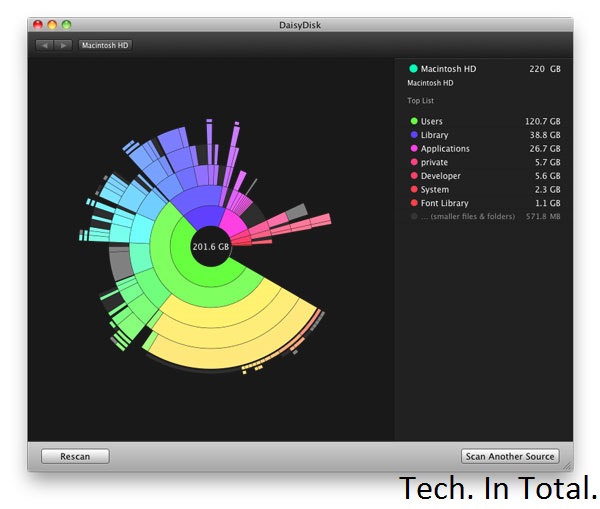
Whether your drive is in a computer or a mobile device, if it gets filled up you're probably going to lose some speed in the process. Although you may have a number of important files on that drive, there's still a bunch of stuff you can get rid of. On a desktop computer, the easiest way to find what's taking up a bunch of space is to use a disk space analyzer. Then you can use that information to figure out what to delete.
Most Android users can migrate data to a microSD card and call it a day, but if you're rooted you can use an app like SD Maid to clean things up automatically. If you're running iOS, you don't get an automatic method for cleanup but you can view what's taking up all that space. Head on over to the Settings app, tap General, and then tap Usage. You'll get a rundown of which apps are using how much space so you can delete them, or at least delete some of the data they're saving on your device.
9. Install a Custom ROM on Your Android

When Android 4.1 Jellybean is released (and actually on real devices), the OS' sluggishness might be a thing of the past. For those of us still running 4.0 or earlier and are bothered by speed issues, choosing a speed-optimized ROM can help remedy the issue. Speed is probably not the first priority of the ROM that comes with your device, so do a little research to see what's available and if you can flash something better.
8. Speed Up Dropbox's File Syncing Speeds

You can only upload as fast as your connection allows, but Dropbox—by default—limits your upload speeds no matter what. Instead of maximizing your connection, it automatically choices whatever speed it believes is optimal. You don't have to let Dropbox choose for you. You can limit it to any speed yourself, or remove that limit entirely:
On Windows, Click Dropbox in the system tray, then Preferences > Bandwidth; on Mac, click Dropbox in the menu bar, then Preferences > Network > Bandwidth > Change Settings. Once there, change your Upload rate to "Don't limit", or if you're familiar with your network's upload bandwidth and want to exercise a little more control, pick an upload limit that you're comfortable with in the Limit to field.
That's all there is to it.
7. Uninstall Unnecessary Apps

There's nothing wrong with a few apps on your computer, but when you're running a ton of them it can slow things down. If you need them you need them, but there are probably a few you don't. At the very least the apps are using your disk space, if not taking up additional resources, so it's good to audit your collection and uninstall what you don't need. Unsurprisingly, uninstallers can make this process a little easier for you. They give you a list of your apps and let you remove them with a few clicks. You still have to audit the list yourself, but it's a process that's much more simple than manual removal.
On mobile devices this isn't so much of an issue as both iOS and Android make it pretty simple to get rid of an app you don't want. Sometimes you end up with a lot of apps and aren't sure what you can get rid of.
6. Perform System Maintenance and Optimization

Modern operating systems perform maintenance tasks on their own, but these automated routines aren't perfect. It's a good idea to perform these tasks yourself on a monthly or bi-monthly basis. On Windows, CCleaner will get the job done. It works on OS X as well, but we prefer Onyx.
5. Speed Up Browsing Times by Optimizing Your DNS Settings

The amount of time you spend waiting for a site to load can be a bit faster if you're using the best DNS servers. The problem is, which servers you ought to be using will depend on your location. Namebench is a free utility for Windows, OS X, and Linux that'll run tests to figure that out for you so you can optimize your DNS settings. The test can take a little while to complete, so run it, take a break, and come back to better DNS server suggestions.
4. Install a Lightweight Operating System

Sometimes your computer is just old and any speed gains you can tweak out of it are not going to be worth your time. Instead, it's better to just say goodbye to the machine as you know it and give it a lightweight operating system it can run with ease. Which OS should you pick? some good ones for netbooks (which may do just as well for old machines), but generally that means some flavor of Linux. While that'll work for a lot of Tech. In Total. readers, it won't for everyone. If you'd rather stick with Windows, trim it down to the bare essentials. It may not be as fast as some of those tiny Linux distributions, but it'll be a lot faster than a feature-rich copy of Windows.
3. Boost Your Boot Time

You're probably not rebooting your computer with too much regularity, but that can make it all the more frustrating when you have to wait to see your desktop again. While booting up is always going to take a little while, you can speed it up. Windows users have a great tool called Soluto that helps you fix a number of issues that cause slow performance, including problems that affect boot times.
OS X users don't have such a nice solution, but OS X is pretty quick when it comes to the actual boot screen. More slowness occurs after you see the desktop and all the little things you have installed start to open. If you want to remedy that situation, just head into the System Preferences app, the Users and Groups preference pane, and click on your user. In the Login Items tab you'll have a list of all the stuff that you've set to run when you log in. If there's anything in there that you don't really want, just remove it from the list and your startup time will improve. Users of OS X Lion (or later) may also benefit from disabling the Resume feature, which restores your computer to its previous state as soon as you boot up. You can do this in the General preference pane in System Preferences by unchecking the box next to "Restore windows when quitting and re-opening apps."
2. Overclock Your Processor

If you literally want to speed up your computer, that's what overclocking can do for you. Some processor overclocking provides greater speed gains than others, so you'll want to do a little research before you jump right in. The process takes quite a bit of time, commitment, and care, so you don't want to bother if you're in for negligible speed gains. You can even overclock your video card, too.
1. Get an SSD

By now, it shouldn't come as a surprise that we think the SSD is the best upgrade you can get for your computer and now is a great time to buy one. When home for the holiday, I stopped in at Microcenter and found 120GB OCZ Vertex and Agility SSDs for under $100. I've seen online deals for even less from time to time. SSDs have never been more affordable and they can make a sluggish computer feel brand new. If you've been sitting on the fence about making the upgrade, now's a great time to make the change. Just know that you'll never go back.
Samsung’s new 75-inch TV has a big price tag to match

That 55-inch TV you've been watching Netflix on is starting to look awfully small, now that Samsung has taken the wraps off its new 75-inch 75ES9000. The set, now on sale in South Korea, packs more than just a massive LED-backlit display in its incredibly thin 7.9mm deep frame.
In addition to featuring common Smart TV apps such as Netflix and Twitter, the television includes built-in wifi and a video camera that can be used for video conferencing. The camera also lets you interact with the on-screen display using hand gestures, much like Microsoft's Kinect for the Xbox 360. In fact, you can even control the TV using your voice.
All of this screen real estate and the technology behind it comes at a pretty steep price. The 75ES9000 is selling for 19.8 million South Korean won, or approximately $17,442. If you're in the market for a TV — especially one you can get now, and for less than the price of a car.
Nitendo Wii: A Quick Review

Gaming & Gadgets When the Nintendo Wii was released, many people were not totally sure where Nintendo was going with this new game console. However, even though the Wii lacks many of the hardware and multimedia capabilities that its chief competitors offer, its focus on interactive game play and game title development has helped it maintain its strong popularity among video game consolesThe Wii Sports package helped solidify the Wii's reputation for interactive game play while proving to be its best-selling game. The Wii remote controllers enable users to move and mime the motions of different activities, making it a much more interactive and enjoyable gaming experience. With expanded controller options, including nunchucks and boxing gloves, the Wii has carved a niche for itself that seems well insulated against the advances of any gaming competitors. When compared with older Nintendo gaming consoles, the Wii has taken the idea of gaming and made it into something that everyone can enjoy without feeling as if they accomplished nothing during the process.
The Wii Sports package helped solidify the Wii's reputation for interactive game play while proving to be its best-selling game. The Wii remote controllers enable users to move and mime the motions of different activities, making it a much more interactive and enjoyable gaming experience. With expanded controller options, including nunchucks and boxing gloves, the Wii has carved a niche for itself that seems well insulated against the advances of any gaming competitors. When compared with older Nintendo gaming consoles, the Wii has taken the idea of gaming and made it into something that everyone can enjoy without feeling as if they accomplished nothing during the process.
Features
 While other companies are seeking to improve their energy usage that involve decreasing CPU and GPU performance, the Wii maintains a comfortable position, with Nintendo knowing that further hardware upgrades and improvements can be made with limited impact on energy. The Nintendo Wii dispels the myth of the sedentary video gamer with its fun, engaging and interactive video game play. With hundreds of titles that are designed to get you off the couch and onto your feet, the Nintendo Wii takes its community offline and into the living room. However, there are still dozens of titles that can be played with players in living rooms across the world, on your feet or otherwise.
Despite lacking video and voice accessories, Nintendo offers dozens of controller options ranging from specialized, game-specific controllers like boxing gloves to all-around controllers like the popular nunchucks design, all of which operate wirelessly. One of the biggest changes to the gaming world is the idea of staying in shape while playing a video game. Wii Fit is just one of many games that utilize the Wii Fit Balance Board, which can be used for running, yoga and even sports games. Nintendo has truly taken the idea of having fun and working out and combined them into something everyone can and will enjoy.
 When it's compared to other gaming consoles, the Nintendo Wii lacks a lot of processing power we see in other game consoles. However, the lack of power is not really a big deal since most games for the Wii use cartoon characters or are quite simple in design. The simple design gives Nintendo the freedom to make lengthy games that work in unison with the Wii Remote.
The Wii also lags behind its competitors in the way of multimedia, offering little compatibility for most audio and video file format discs. However, with some remote-access features and a seamless integration feature for use with the Nintendo DS handheld console, the Wii does leave several inroads for additional uses. The Wii is fully compatible with all versions of Nintendo's handheld video game consoles. The Nintendo DS can be used as an additional controller for the Wii, and it lets you view and download games from the game console.
Online Community
 WiiConnect24 is part of the Wii's online service that offers several unique Wii Channels, including a Wii Shop Channel, while providing online game play for users. The matchmaking process for organizing users adjusts according to skill level, age, language, region and other custom needs. With unique user IDs, friends can locate one another with relative ease. However, despite offering some well-designed online community features, the Wii lacks many of the user communication tools like video and voice chat that we have come to expect in the world of online gaming.
The Wii utilizes IEEE 802.11 wireless technology to provide users with limited web browsing and online game play. However, the Wii might not be ideal for users looking to integrate their game play with computer and multimedia functions. Its remote-access capabilities are a strike in its favor, enabling users to access their Wii consoles from a remote location with the help of a Nintendo DS.
Summary
While some of the other game consoles we reviewed provide better options for multimedia and online game play, the Nintendo Wii continues to place an emphasis on game development. By creating something new and inventive, Nintendo has made a huge impact on the world of console gaming. Competitors have begun to embrace the idea of motion gaming, but none has the time and experience that Nintendo has put into the Nintendo Wii. If you are tired of sitting on the couch playing the same old games and want to get on your feet and enjoy a creative way of gaming, the Nintendo Wii game console is the optimal choice.
Sony Playstation 3: A Quick Review

There's general agreement that Sony stumbled out of the gate with the PlayStation 3. Months of intense hype were followed by a late launch (fully a year after the Xbox 360) and a staggering $600 price tag for the deluxe model. Even worse, the PS3 didn't have any real must-have exclusive titles, and despite the power of its vaunted Cell processor, multiplatform games from third-party developers didn't look appreciably better than the respective titles on the 360.
Since then, the company's been modifying the PlayStation product line to better fit the competitive market landscape. As of November 2007, a "bargain" PlayStation 3 can be had for a mere $400--but that model lacks the ability to play older PS2 games. If that feature is important to you, you'll need to shell out an additional $100 for the "deluxe" 80GB PlayStation 3 model--or if you're lucky enough to find a 60GB version, the one reviewed here, we'd highly recommend jumping on that as well. While the 60GB version of the PlayStation 3 is currently being phased out of production by Sony, the differences between it and the 80GB model are minimal. Owners of PS2 games may prefer the 60GB model because of its greater compatibility with that system's games due to its internal hardware emulation instead of the 80GB's software emulation. In addition to backward compatibility with many PS2 games, the $500 PS3s include more USB ports and a built-in flash media reader.
 Unfortunately however, the 60GB version still suffers from the same problem currently afflicting this entire generation of PlayStation hardware: a dearth of compelling games. While the console offers a handful of great exclusives (Warhawk, Resistance: Fall of Man, and Heavenly Sword), it doesn't look like the PS3 will have some real system-sellers until 2008 and beyond, when Metal Gear Solid 4, Killzone 2, Gran Turismo 5, and God of War III eventually arrive. Plenty of excellent third-party titles exist--from Assassin's Creed to Call of Duty 4--but they're also available on the Xbox 360, which in turn has a cadre of must-have titles (Halo 3, Mass Effect, Gears of War) that aren't on the PS3. Likewise, the Nintendo Wii continues to draw away potential PS3 buyers with its cheaper hardware and more casual and broad-based approach to gaming. Put another way, the PlayStation 3 still feels more like a work in progress than do the rival Wii and Xbox 360. Still, if you want to go beyond the low-res graphics on the Wii and avoid the Xbox 360's notorious red ring of death, the Sony PS3 delivers a full-on Blu-ray player, network media hub, and HD gaming console with a rapidly growing library of impressive titles.
Design
Like the Xbox 360 and Nintendo Wii, the PlayStation 3 can stand vertically or lie horizontally in an AV rack, though because of its curved top, it's not meant to have any other components resting on top of it. Early prototypes were shown in white and silver, but the PS3 is currently available only in black. The 20GB version (now discontinued) was all black, but the larger capacity models are highlighted with a chrome trim--and there's no way to customize its look as you can with Xbox 360's interchangeable, if overpriced, faceplates. Judging from Sony's recent decision to bring out the PSP in more colors, we don't expect the company to stick to the black-only option for too long, especially since this system, like the PSP, is a fingerprint- and smudge-magnet. If you handle it at all, you'll end up having to wipe it off, so you'll probably just want to stick it in a rack and leave it there.
As for its dimensions, the PS3 measures 12.8 inches wide by 3.8 inches high by 10.8 inches long, which is roughly in line with the overall volume of the Xbox 360. That said, the PS3 does weigh a bit more--11 pounds to the 360's 9.9 pounds including power supply--so if you're going by heft alone, you're getting almost 10 percent more console. Most impressively, there's no external power supply for the PS3; you just plug the included power cable--it's the same standard three-prong style you'll find on most desktop PCs--into the back of the unit and you're good to go. For those of us who own an Xbox 360, and have had to struggle with its massive brick of a power supply, this seems like a remarkable feat on Sony's part.
 Like the Nintendo Wii, the PS3 has a slot-loading disc drive.
One obvious difference between the Xbox 360 and the PS3 is the way you load media. As opposed to the more typical tray loader, the PS3 has a front-slot-loading, Blu-ray optical-disc drive, which contributes to the unit's slicker appearance. Discs slide in and eject smoothly enough, so chalk one up for the PS3 here.
Media card readers are located beneath a flip-up door, and four USB ports are nearby.
On the front, you'll find four USB ports for connecting (and charging) controllers and other accessories, including USB keyboards, thumbdrives, and the PSP. Four ports are nice, but we would have liked to have seen at least one USB port on the back for connecting peripherals such as a camera (the PS Eye) that spoil the PS3's otherwise clean lines by sticking obtrusively out of the front. Rounding out the front panel is a built-in memory card reader behind a door that supports not only memory cards from Sony's entire Memory Stick family, but Compact Flash and SD/MMC cards as well. (Sorry, Olympus fans--there's no built-in xD support, but you can still hook up your camera--or an external card reader--via USB.)
You'll find HDMI--but no USB--on the rear panel.
 Around back is where you'll find ports for Ethernet, HDMI output, optical digital audio output (SPDIF), and the proprietary PlayStation AV output for analog audio and video. A composite AV cable ships with the unit, and because it uses the same connector as the PlayStation 2, that system's S-Video and component cables should work with it, as well (to get HD video, you'll need component or HDMI). Unlike the proprietary snap-on hard drive of the Xbox 360, the PS3's 60GB internal hard drive is user replaceable with any off-the-shelf laptop drive. The only caveat: It uses the smaller 2.5-inch drive size, which are twice--or even close to three times--as expensive as the larger 3.5-inch hard drive that goes into a desktop computer.
Controller makeover
The single controller that comes with the PS3 is very similar looking to the traditional PlayStation 2 Dual Shock gamepad, but there are some notable differences. For starters, it's wireless. You can connect as many as seven (!) controllers via the system's built-in Bluetooth, which Sony's claims offers a 20-meter range (about 65 feet). Recharging the built-in battery simply requires connecting the included USB cable between the console and the controller. You can continue to play as the battery juices up (Sony pledges 30 hours of gameplay between charges), but the cable's somewhat short 5-foot length will put you right on top of the TV. That said, the controller has a standard mini-USB port similar to the one found on many digital cameras and PC peripherals, so swapping in a longer cable--or using a USB extender--shouldn't be a problem.) Unfortunately, the battery isn't removable, which means that if it dies--as inevitably it will someday--you'll have to replace the entire controller ($50) if you want to play wirelessly. By comparison, the Xbox 360 and Nintendo Wii controllers offer user-replaceable batteries: AAs or proprietary rechargeables for the 360, and AAs for the Wii.

The wireless controller recharges by connecting via the included USB cable.
As for the controller's design, Sony has made a few tweaks. The L2 and R2 trigger buttons are a bit bigger, and the increased depth in stroke offers players more subtle game control. Sony has also increased the tilting angle of the analog joysticks to give you more precise control and a wider range of motion. Those analog sticks are more sensitive as well. The PS2's Dual Shock controller had 8-bit sensitivity, while the PS3's controller has 10-bit motion detection. The SixAxis controller also has a centered Home button, which functions much like its counterpart on the Xbox 360 controller. You use it to return to the console's main menu screen, as well as to sync the controller to the console and start it up or shut it down wirelessly.
The other big upgrade on the SixAxis controller is motion sensitivity. As the name indicates, the controller's capable of sensing motion in six directions: up, down, left, right, forward, and backward. Game developers have incorporated it in many of the new games in one form or another. For example, in Call of Duty 3, you can arm explosives with a twist of the controller. 2K's NBA 2K8 also makes interesting use of the tilt feature, allowing you shoot free throws by motioning a shot with your controller.
To be sure, some implementations of the tilt sensitivity are better than others. Some games' use of it are optional and can be switched off, as we can certainly see some folks not wanting to bother with it at all. Clearly, Sony wanted to steal some of Nintendo's thunder, and there's no denying that the Wii's motion-sensitive controllers are more central to that console's DNA. The Wii controllers are also more sophisticated, including the ability to measure actual motion (spatial movement) and acceleration, rather than just tilting--but unlike the Wii, the PS3 doesn't require a motion-sensor bar in front of the TV. (The current Xbox 360 controllers offer no motion sensitivity at all.) It's safe to say we'll see more innovative uses of the tilting sensitivity feature in future games--it definitely adds an extra level of control when flying the eponymous attack vehicle in Warhawk. On the other hand, the highly touted Lair, is widely considered unplayable, thanks to a poorly implemented Sixaxis control scheme.
The good: Swanky design with quiet operation; all games in high-definition; PSP-like user-friendly interface; plays high-def Blu-ray movies in addition to upscaling standard DVDs; built-in Wi-Fi and flash media reader; 60GB hard drive; online play is free; HDMI output with 1080p support; no external power supply; free online gaming service; plays PS2 and PS1 games; backwards compatibility is hardware based.
The bad: Compelling exclusive games are still few and far between; PlayStation Home and rumble controller not available until 2008; a USB port on the back would've been nice; no infrared port means non-Bluetooth universal remotes aren't compatible; glossy black finish is a fingerprint magnet; online gaming, media, and commerce options not nearly as developed as Xbox Live.
The bottom line: The high-end Sony PlayStation 3's larger hard drive and ability to play PS2 games makes it a worthwhile alternative to the cheaper model--so long as you're willing to wait several months for the more promising exclusive titles to hit store shelves. If backward compatibility is your top priority, this hard-to-find model may be worth the search.
Microsoft Xbox 360 Slim (250GB)

Gaming & Gadgets Microsoft kick-started the "next-generation" of gaming on November 22, 2005, when the company released the Xbox 360, beating both Nintendo and Sony to market. Since then, the console has sold roughly 40 million units worldwide and has brought some innovative ideas to the gaming industry in the form of Xbox Live, the online marketplace, and gamer achievements.
The console is not without its shortcomings, though. Most notably, the infamous "red ring of death" controversy has plagued the system since its launch. The defect can be traced to the system's inability to properly dissipate heat, which in turn renders some of the vital innards unusable. Though Microsoft has remained quiet about an exact fail rate percentage, some analysts have that number as high as 40 percent, with recent reports hovering around a one in four odds of failing within the first two years of ownership. Other complaints vary from lack of built-in Wi-Fi to denying users the ability to replace the hard drive like the PlayStation 3 offers.
 At E3 2010, Microsoft unveiled an Xbox 360 redesigned from the ground up. Officially referred to as the "S" console--or Slim, as we've come to call it--the latest iteration packs a 250GB hard drive, built-in Wi-Fi, and a new design that's about 17 percent smaller than the previous models.
The new Xbox 360 certainly addresses most of the concerns we've had with the versions before it, but we don't think it warrants a purchase if you already own an Xbox 360 in working order with an HDMI-out port and a hard drive.
In this review we'll look at what's new in the Xbox 360 Slim, so for those who are interested in a look at the complete Xbox 360 experience, we recommend reading our reviews of the consoles prior.
The new Xbox 360 Slim is about 17 percent smaller than its predecessor.
Design
The new Xbox 360 ditches the matte-plastic encasing seen on the white and Elite versions and instead opts for the now-infamous fingerprint magnet glossy black finish that covers so many gadgets of today. The console measures in at 2.9 inches tall by 10.6 inches wide by 10.4 inches deep and weighs a bit over 6 pounds, making it noticeably smaller than its big brother.
There are far fewer buttons on the new Xbox 360; most notably absent are the disc tray and power buttons from the previous consoles. Instead, both are now touch-sensitive; a small notch above the disc tray opens it, and the unit can be turned on simply by touching the circular silver power area. Also, a tone is played from inside the console whenever either of the two touch areas is engaged.
The silver power circle also represents the number of controllers connected and will rotate depending on how the console is oriented (either horizontally or vertically). Past 360 owners will associate this area with the "red ring of death" error message, but Microsoft has removed red LEDs from the console, so now any malfunction will be represented with a series of green lights.
To the right of the power circle is a spring-loaded door hiding two USB ports. Next to it is the controller sync button, which also doubles as the system's infrared (IR) port. Though there seemed to be some discussion as to whether this made it difficult for commands to be given to the Xbox 360, our tests with a Harmony remote show no sign of such issues.
For those hoping to ditch the enormous "power brick" that tethered the console to a power source, you're half in luck. The proprietary connection is definitely smaller, but there is still a power box you must deal with. Though it's about half the size of the original, we're much more comfortable downgrading the "brick" to a "block."
One drawback of the newly designed console is incompatibility with older Xbox 360 faceplates. We can't say that this customizable feature was one of the console's strong points, but nevertheless, no faceplates will work with the new Xbox 360.
Features
As mentioned above, the Xbox 360 Slim aims to correct some of the annoyances and complaints current Xbox 360 owners have voiced. The new console comes packed with a 250GB hard drive, built-in Wi-Fi that supports up to 802.11n, five USB ports, and one additional slot devoted to Microsoft Kinect.

The rear of the new Xbox 360 also looks a bit different compared with the original. Now onboard is a devoted digital optical audio-out port that can be used in conjunction with an HDMI, component, or composite video connection.
The good: Sleeker design; 17 percent smaller; much quieter operation; better cooling; touch-sensitive power and disc tray; 250GB hard drive; built-in Wi-Fi; five USB ports; dedicated Kinect port; onboard optical digital audio.
The bad: The hard drive is still proprietary; controller on D-pad remains unchanged; cumbersome power block; renders existing faceplates useless; no cables for HD gaming out of the box.
The bottom line: Though the new Xbox 360 certainly addresses most of the concerns we've had with the versions before it, we don't think it warrants a purchase if you already own an Xbox 360 in working order with an HDMI-out port and a hard drive.
Alienware M11x Portable Gaming Laptop

Alienware™ M11x: Ultra-mobile gaming laptop designed to pack a punch
- Starting at less than 4.5lbs*, the Alienware M11x is the perfect mobile gaming rig.
- Featuring next-generation NVIDIA® graphics with up to 2GB of DDR3 graphics memory, the M11x is deceptively small, yet diabolically strong.
- Power through hard-core games and intense applications with the latest 2nd Gen Intel® Core™ i processors

Mobile Domination
Bedroom, dorm room, coffee shop, friend’s house — stay anywhere in the game2. Starting at less than 4.5 lbs3, the ultraportable M11x is designed for gamers who have a mobile life. Drop it in your bag and go.
Out-of-This-World Gaming Experience
Gaming is all about experience — the experience of visiting new worlds, of helping friends and crushing enemies, and of showing off your skills.
 Give that experience a boost. Boot up your ultraportable M11x laptop wherever you are and you’ll have the power to pulverize at your fingertips. Engage your senses with the HD display and wake your neighbors with some of the best audio options on an 11.6" laptop.
Then get moving. Head over to the library. While everyone else is studying, you’ll be exploring other dimensions and annihilating every horrid creature you encounter. And now you won’t have to stop in the middle of your game. Switchable graphics will optimize your battery life, letting you cram more carnage into a single charge.
Performance Power — Unleashed!

Your opponents will never see it coming: the punishing power of the latest performance technology, paired with the lightweight design you need for on-the-go annihilation.
Winning Vision: Stay at the top of your game with NVIDIA® GeForce® 540M series graphics technology and up to 2GB4 of DDR3 graphics memory.
Processing Muscle: Put opponents in their place with lightning fast processing power — 2nd generation Intel® Core™ i7 processors.
Memory: With up to 16GB of dual channel DDR3 1333MHz memory, the Alienware™ M11x is a multitasking madness powerhouse.
High Definition Visuals: With the crystal-clear 11.6" (720p WLED HD — 1366x768) display, your games and multimedia look incredible.
Command and Customize
Control and personalize your system from the user-friendly Alienware Command Center.

AlienFX™ Lighting Controls: Show your attitude! Choose from an array of color and transition effects, and assign them to distinct zones, including the keyboard, touchpad and more.

AlienFusion™ Power Management: You decide when you need maximum performance or when to scale back power for less intensive applications.

AlienTouch™ Touchpad Controls: Customize your touchpad’s sensitivity to prevent accidental contact and activate virtual scrolling to enable vertical and horizontal scrolling with just a touch.

 Preloaded and Ready to Go: Steam®, the popular digital distribution gaming software, can be preinstalled on your Alienware® M11x laptop. Opt to have Eve Online, the popular sci-fi MMO, preinstalled as well, so you can stop wasting time and start playing!
Mark of the Conqueror: Laser cut and etched in metal for all time — your Alienware laptop comes with a custom engraved name plate. Mark your M11x with your name, clan, nickname or a threat of dismemberment to anyone who touches your system.
TECH. SPECS.
Processor:
TECH. SPECS.
Processor:
- Intel® Core™ i5 2467M 1.6GHz (2.3GHz w/Turbo Boost, 3MB Cache)
- Intel® Core™ i7 2617M 1.5GHz(2.6GHz w/Turbo Boost, 4MB Cache)
- 6GB DDR3 at 1333MHz
- 8GB Dual Channel DDR3 at 1333MHz
- 16GB Dual Channel DDR3 at 1333MHz
- Intel® QS67 Express Chipset
- NVIDIA® GeForce® GT540M graphics with 1.0GB Video Memory and Optimus
- NVIDIA® GeForce® GT540M graphics with 2.0GB Video Memory and Optimus

Popular Posts
-
 It's been about three years since Microsoft unveiled a new version of Office, and particularly with Windows 8 just months away from ...
 -
 There's general agreement that Sony stumbled out of the gate with the PlayStation 3. Months of intense hype were followed by a la...
 -
 Latest Windows Phone 8 rumor suggests that current Windows Phone devices will receive the update Microsoft has yet to come forward wi...
 -
Microsoft is holding an invitation-only press event in San Francisco today at which it is expected to debut the next version of its...
-
 Gaming & Gadgets Microsoft kick-started the "next-generation" of gaming on November 22, 2005, when the company release...

