


Showing posts with label Laptops. Show all posts
Showing posts with label Laptops. Show all posts
Intel-powered ultrabooks a major flop: Research

Ultrabooks -- those sleek, lightweight laptop computers that were supposed to fire up PC sales -- are not catching on with consumers, a new survey shows.
The research firm IHS iSuppli on Monday slashed its forecast in half for the ultrabooks, saying high prices and ineffective marketing have culminated in a failure to lure buyers away from other hot-selling mobile gadgets.
The survey showed 10.3 million ultrabooks will ship worldwide in 2012, down from the previous forecast issued earlier this year of 22 million units. More than half of the shipments for the year are expected in the fourth quarter.
For next year, iSuppli cut its forecast to 44 million from a prior estimate of 61 million.
"So far, the PC industry has failed to create the kind of buzz and excitement among consumers that is required to propel ultrabooks into the mainstream," IHS analyst Craig Stice said.

"This is especially a problem amid all the hype surrounding media tablets and smartphones. When combined with other factors, including prohibitively high pricing, this means that ultrabook sales will not meet expectations in 2012."
The latest report said that to fire up sales, prices need to come down from the $1,000 range to around $600.
It said if ultrabooks using the new Windows 8 operating system come close to the $600-$700 range next year, while adding in an new features such as touchscreen, a good chance exists for strong sales in 2013. Otherwise, consumers may opt for other devices.
"With the economy languishing, ultrabook sellers may have trouble finding buyers at the current pricing, especially with fierce competition from new mobile computing gadgets such as the iPhone 5, Kindle Fire HD and forthcoming Microsoft Surface" tablet, Stice said.
IHS said that despite the challenges, ultrabook sales will rise to 95 million by 2016.
The ultrabook is a term for a lightweight notebook computer coined by Intel. But ISH said Intel's "stringent" definitions are prompting some manufacturers to shun the term and call the PCs, "ultrathins," instead.
Source: The Times Of India
Top 10 Ways to Speed Up Your Slow Technology

As fast as your technology may have been on day one, it's probably not quite so speedy now. That doesn't mean you can't restore it to its former glory. Whether it's your desktop, laptop, or mobile device, here are 10 great ways to speed up your slow technology.
10. Clean Up Your Drive
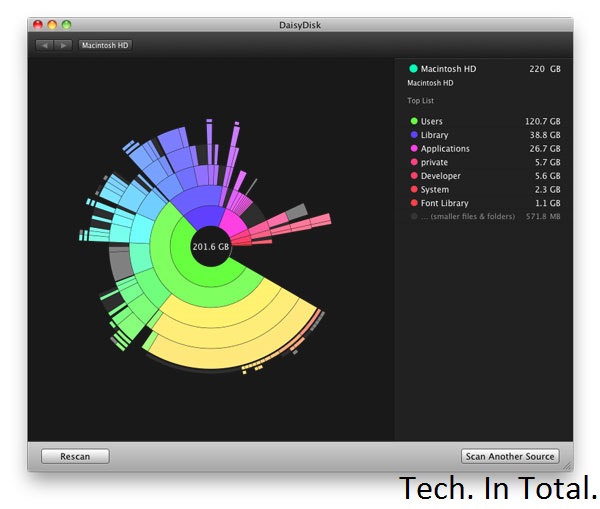
Whether your drive is in a computer or a mobile device, if it gets filled up you're probably going to lose some speed in the process. Although you may have a number of important files on that drive, there's still a bunch of stuff you can get rid of. On a desktop computer, the easiest way to find what's taking up a bunch of space is to use a disk space analyzer. Then you can use that information to figure out what to delete.
Most Android users can migrate data to a microSD card and call it a day, but if you're rooted you can use an app like SD Maid to clean things up automatically. If you're running iOS, you don't get an automatic method for cleanup but you can view what's taking up all that space. Head on over to the Settings app, tap General, and then tap Usage. You'll get a rundown of which apps are using how much space so you can delete them, or at least delete some of the data they're saving on your device.
9. Install a Custom ROM on Your Android

When Android 4.1 Jellybean is released (and actually on real devices), the OS' sluggishness might be a thing of the past. For those of us still running 4.0 or earlier and are bothered by speed issues, choosing a speed-optimized ROM can help remedy the issue. Speed is probably not the first priority of the ROM that comes with your device, so do a little research to see what's available and if you can flash something better.
8. Speed Up Dropbox's File Syncing Speeds

You can only upload as fast as your connection allows, but Dropbox—by default—limits your upload speeds no matter what. Instead of maximizing your connection, it automatically choices whatever speed it believes is optimal. You don't have to let Dropbox choose for you. You can limit it to any speed yourself, or remove that limit entirely:
On Windows, Click Dropbox in the system tray, then Preferences > Bandwidth; on Mac, click Dropbox in the menu bar, then Preferences > Network > Bandwidth > Change Settings. Once there, change your Upload rate to "Don't limit", or if you're familiar with your network's upload bandwidth and want to exercise a little more control, pick an upload limit that you're comfortable with in the Limit to field.
That's all there is to it.
7. Uninstall Unnecessary Apps

There's nothing wrong with a few apps on your computer, but when you're running a ton of them it can slow things down. If you need them you need them, but there are probably a few you don't. At the very least the apps are using your disk space, if not taking up additional resources, so it's good to audit your collection and uninstall what you don't need. Unsurprisingly, uninstallers can make this process a little easier for you. They give you a list of your apps and let you remove them with a few clicks. You still have to audit the list yourself, but it's a process that's much more simple than manual removal.
On mobile devices this isn't so much of an issue as both iOS and Android make it pretty simple to get rid of an app you don't want. Sometimes you end up with a lot of apps and aren't sure what you can get rid of.
6. Perform System Maintenance and Optimization

Modern operating systems perform maintenance tasks on their own, but these automated routines aren't perfect. It's a good idea to perform these tasks yourself on a monthly or bi-monthly basis. On Windows, CCleaner will get the job done. It works on OS X as well, but we prefer Onyx.
5. Speed Up Browsing Times by Optimizing Your DNS Settings

The amount of time you spend waiting for a site to load can be a bit faster if you're using the best DNS servers. The problem is, which servers you ought to be using will depend on your location. Namebench is a free utility for Windows, OS X, and Linux that'll run tests to figure that out for you so you can optimize your DNS settings. The test can take a little while to complete, so run it, take a break, and come back to better DNS server suggestions.
4. Install a Lightweight Operating System

Sometimes your computer is just old and any speed gains you can tweak out of it are not going to be worth your time. Instead, it's better to just say goodbye to the machine as you know it and give it a lightweight operating system it can run with ease. Which OS should you pick? some good ones for netbooks (which may do just as well for old machines), but generally that means some flavor of Linux. While that'll work for a lot of Tech. In Total. readers, it won't for everyone. If you'd rather stick with Windows, trim it down to the bare essentials. It may not be as fast as some of those tiny Linux distributions, but it'll be a lot faster than a feature-rich copy of Windows.
3. Boost Your Boot Time

You're probably not rebooting your computer with too much regularity, but that can make it all the more frustrating when you have to wait to see your desktop again. While booting up is always going to take a little while, you can speed it up. Windows users have a great tool called Soluto that helps you fix a number of issues that cause slow performance, including problems that affect boot times.
OS X users don't have such a nice solution, but OS X is pretty quick when it comes to the actual boot screen. More slowness occurs after you see the desktop and all the little things you have installed start to open. If you want to remedy that situation, just head into the System Preferences app, the Users and Groups preference pane, and click on your user. In the Login Items tab you'll have a list of all the stuff that you've set to run when you log in. If there's anything in there that you don't really want, just remove it from the list and your startup time will improve. Users of OS X Lion (or later) may also benefit from disabling the Resume feature, which restores your computer to its previous state as soon as you boot up. You can do this in the General preference pane in System Preferences by unchecking the box next to "Restore windows when quitting and re-opening apps."
2. Overclock Your Processor

If you literally want to speed up your computer, that's what overclocking can do for you. Some processor overclocking provides greater speed gains than others, so you'll want to do a little research before you jump right in. The process takes quite a bit of time, commitment, and care, so you don't want to bother if you're in for negligible speed gains. You can even overclock your video card, too.
1. Get an SSD

By now, it shouldn't come as a surprise that we think the SSD is the best upgrade you can get for your computer and now is a great time to buy one. When home for the holiday, I stopped in at Microcenter and found 120GB OCZ Vertex and Agility SSDs for under $100. I've seen online deals for even less from time to time. SSDs have never been more affordable and they can make a sluggish computer feel brand new. If you've been sitting on the fence about making the upgrade, now's a great time to make the change. Just know that you'll never go back.
Alienware M11x Portable Gaming Laptop

Alienware™ M11x: Ultra-mobile gaming laptop designed to pack a punch
- Starting at less than 4.5lbs*, the Alienware M11x is the perfect mobile gaming rig.
- Featuring next-generation NVIDIA® graphics with up to 2GB of DDR3 graphics memory, the M11x is deceptively small, yet diabolically strong.
- Power through hard-core games and intense applications with the latest 2nd Gen Intel® Core™ i processors

Mobile Domination
Bedroom, dorm room, coffee shop, friend’s house — stay anywhere in the game2. Starting at less than 4.5 lbs3, the ultraportable M11x is designed for gamers who have a mobile life. Drop it in your bag and go.
Out-of-This-World Gaming Experience
Gaming is all about experience — the experience of visiting new worlds, of helping friends and crushing enemies, and of showing off your skills.
 Give that experience a boost. Boot up your ultraportable M11x laptop wherever you are and you’ll have the power to pulverize at your fingertips. Engage your senses with the HD display and wake your neighbors with some of the best audio options on an 11.6" laptop.
Then get moving. Head over to the library. While everyone else is studying, you’ll be exploring other dimensions and annihilating every horrid creature you encounter. And now you won’t have to stop in the middle of your game. Switchable graphics will optimize your battery life, letting you cram more carnage into a single charge.
Performance Power — Unleashed!

Your opponents will never see it coming: the punishing power of the latest performance technology, paired with the lightweight design you need for on-the-go annihilation.
Winning Vision: Stay at the top of your game with NVIDIA® GeForce® 540M series graphics technology and up to 2GB4 of DDR3 graphics memory.
Processing Muscle: Put opponents in their place with lightning fast processing power — 2nd generation Intel® Core™ i7 processors.
Memory: With up to 16GB of dual channel DDR3 1333MHz memory, the Alienware™ M11x is a multitasking madness powerhouse.
High Definition Visuals: With the crystal-clear 11.6" (720p WLED HD — 1366x768) display, your games and multimedia look incredible.
Command and Customize
Control and personalize your system from the user-friendly Alienware Command Center.

AlienFX™ Lighting Controls: Show your attitude! Choose from an array of color and transition effects, and assign them to distinct zones, including the keyboard, touchpad and more.

AlienFusion™ Power Management: You decide when you need maximum performance or when to scale back power for less intensive applications.

AlienTouch™ Touchpad Controls: Customize your touchpad’s sensitivity to prevent accidental contact and activate virtual scrolling to enable vertical and horizontal scrolling with just a touch.

 Preloaded and Ready to Go: Steam®, the popular digital distribution gaming software, can be preinstalled on your Alienware® M11x laptop. Opt to have Eve Online, the popular sci-fi MMO, preinstalled as well, so you can stop wasting time and start playing!
Mark of the Conqueror: Laser cut and etched in metal for all time — your Alienware laptop comes with a custom engraved name plate. Mark your M11x with your name, clan, nickname or a threat of dismemberment to anyone who touches your system.
TECH. SPECS.
Processor:
TECH. SPECS.
Processor:
- Intel® Core™ i5 2467M 1.6GHz (2.3GHz w/Turbo Boost, 3MB Cache)
- Intel® Core™ i7 2617M 1.5GHz(2.6GHz w/Turbo Boost, 4MB Cache)
- 6GB DDR3 at 1333MHz
- 8GB Dual Channel DDR3 at 1333MHz
- 16GB Dual Channel DDR3 at 1333MHz
- Intel® QS67 Express Chipset
- NVIDIA® GeForce® GT540M graphics with 1.0GB Video Memory and Optimus
- NVIDIA® GeForce® GT540M graphics with 2.0GB Video Memory and Optimus

Apple Macbook Air

 Both the 11- and 13-inch MacBook Air now feature the latest generation of Intel processors, the Core i5 and i7. With speeds up to 1.8GHz and faster memory, the new MacBook Air gains up to 2.5x the processing performance over the previous generation.1 MacBook Air also features the Intel HD Graphics 3000 processor, which includes an on-chip engine for video encoding and decoding. That means you experience video playback and FaceTime calls that are smoother, more responsive, and more true to life.
Thunderbolt I/O.
With one port, MacBook Air gives you access to a world of high-speed peripherals capable of transferring data up to 12 times faster than FireWire 800 and up to 20 times faster than USB 2.0. Or use the Thunderbolt port to connect the new Apple Thunderbolt Display and transform your ultracompact MacBook Air into a complete desktop workstation. Power over 4 million eye-popping pixels while enjoying some major benefits: Gigabit Ethernet, FireWire 800, an additional Thunderbolt port, three USB ports, a FaceTime HD camera, 2.1 stereo sound, and a built-in microphone. The display even charges your MacBook Air, so there’s no need to unpack and unravel your power adapter. With two quick connections — the MagSafe power cord and the Thunderbolt cable — you’re up and running in seconds. Unplug them, and you’re on your way just as fast.

All-flash storage.
 Devices like iPhone and iPad have already demonstrated the advantages of flash storage: reliability, speed, and efficiency. So the decision to use flash storage in an ultracompact notebook like MacBook Air made perfect sense. With flash, your computer starts up in almost no time and accesses data quickly. Flash also gives MacBook Air the astonishing ability to remain in standby mode for up to 30 days.3 Which means your MacBook Air snaps to in an instant, whether you open it tomorrow, next week, or next month.
Backlit keyboard.
 As incredibly compact as MacBook Air is, it still manages to fit a full-size keyboard that makes typing as natural as it is comfortable. And now the keyboard is backlit, so you can type with ease in even the dimmest light. A built-in ambient light sensor detects changes in lighting conditions and adjusts the display and keyboard brightness automatically. From a seat in a sunny café to a seat on a cross-country red-eye, you’ll always have the perfect lighting for any environment.
Multi-Touch trackpad.
The Multi-Touch gestures in OS X Lion make everything you do on MacBook Air more intuitive, direct, and fun. And the spacious Multi-Touch trackpad is perfectly designed for them, whether it’s a three-finger swipe to activate Mission Control or a four-finger pinch to see all your apps in Launchpad. Gesture responses in Lion are smooth and realistic. So when you’re scrolling up and down a web page or swiping from one full-screen app to another, it’s almost like you’re touching what you’re seeing.

Display, camera, and speakers.
High-resolution display.
Millions of pixels. Millimeters thin.
 Corner to corner and pixel by pixel, the MacBook Air display is both an engineering feat and a design breakthrough. The display measures a mere 4.86 millimeters (0.19 inch) thin, yet the resolution is so high, you’ll feel like you’re looking at a much larger screen. And with good reason. The 11-inch MacBook Air features a resolution equal to that of your typical 13-inch notebook, while the 13-inch MacBook Air wows with a resolution equivalent to a typical15-inch notebook.
FaceTime camera.
Your smile goes for miles.
 The wafer-thin MacBook Air display houses something pretty huge: the FaceTime camera. It’s so thin — even thinner than the camera on iPhone 4 — you barely notice it, but it’s incredibly capable. Using the FaceTime for Mac app, you can make video calls with anyone who has a Mac, iPad 2, iPhone 4, or the latest iPod touch.2
Stereo speakers.
Heard but not seen.
 Despite its compact form, MacBook Air delivers full stereo sound. Space-efficient design inside the enclosure allows for the placement of left and right speakers that project sound through the keyboard. So you’re able to enjoy a richer audio experience while chatting online, watching TV shows, listening to music, or playing games.
Long-lasting battery.
 Since space-saving flash storage leaves room for a bigger battery, you can devote more time to the things you enjoy most. Things like browsing the web, editing photos, and watching videos. Get up to 5 hours of battery life on a single charge on the 11-inch model and up to 7 hours on the 13-inch model. Put MacBook Air to sleep, and it enters standby mode to conserve battery life for up to 30 days.3 When you come back to your MacBook Air and open it up, it’s on in an instant.
Connectivity.

Dell Inspiron 14z Laptop
Live your busy life with the thin, sleek and fun Inspiron 14z. Its compact, thin aluminum design packs impressive productivity and entertainment features you want at the right price.
Count on responsive performance.

Get a look that’s cool and sleek from every angle.
Whether you choose Diamond Black or optional fire red, Inspiron 14z looks amazingly thin (0.998” – .94”) and sleek and accentuates your sense of style.
Immerse yourself in vivid sound and vision.
Enjoy your favorite movies on the go with a 14” HD screen and high-quality SRS Premium Sound™.
Connect and share each part of your life.
Connect with those you love.
Enjoy sharing movies, photos and online content with friends and family through a wireless connection to your HDTV5.

Connect and sync devices across your network.
Keep your digital life synced up and at your fingertips with Dell Stage and SyncUP, powered by Nero. It’s never been easier to access and manage your favorite photos, music, and videos across your Dell computers, phones and other devices.
Dell Inspiron Duo Tablet PC

Gadgets & Computing Devices Flip into action. Combine the best of mobile entertainment and everyday computing with this innovative 10.1” convertible tablet.
- Switch from tablet to laptop in seconds with the flip-hinge design.
- View your multimedia the way it was meant to be seen with the fully flash-capable Inspiron™ duo.
- Transform your convertible tablet into a digital picture frame, an alarm clock or a music player with the optional Inspiron duo Audio Station.
- Available in three colors: Foggy Night Black, Fastback Red and Marlin Blue.

Smart Design
Converts to your needs — The unique flip-hinge design enables seamless transition between touch and type modes.
Your life at your fingertips — The intuitive touch screen and duo Stage software provide quick and easy access to your music, movies and photos.

Style to go — The innovative design makes Inspiron duo sleek, easy to hold and small enough to carry anywhere.
Entertainment Center
Picture perfect — Experience superb visuals on the 10.1-inch HD multitouch display.
Make a show of it — Transform it into a digital picture frame, an alarm clock or a music player with the optional Inspiron duo Audio Station featuring JBL® speaker technology.
Flash — View your multimedia the way it was designed to be seen with the fully Flash-capable Inspiron duo.
Performance Art
 All the power you need — Enjoy multitasking and excellent performance with the powerful Intel® dual-core Atom™ processor N550.
Be more productive — Get through everyday tasks quickly and easily with Genuine2 Windows® 7 Home Premium and 2 GB of RAM.
Smooth operator — Get HD display and HD accelerator for smooth HD playback performance.
See me, hear me — Stay connected to friends and family with the 1.3 MP Webcam3 and microphone.
Watch, Play, Listen and Connect


Inspiron R Laptops with 2nd Gen Intel® Core™ Processors
Gadgets & Computing Devices
Switch your lid to match your mood
Introducing the new Inspiron R laptops available in 14", 15" & 17". With 2nd Gen Intel® Core™ processors and optional switch lids, you get the look you want and the performance you need.
Inspiron R, available in 14, 15 and 17-inch sizes.


Inspiron 14R – 2nd Gen Inspiron 15R – 2nd Gen Inspiron 17R – 2nd Gen

Switchable lid designs
Personalize your laptop with SWITCH by Design Studio. Change your look as you please with optional interchangeable lids.
Explore or collect all SWITCH lids.
2nd Gen Intel® Core™ processors
Meet your everyday computing needs with Intel® 2nd Gen Core™ processors and Genuine Windows® 7 Home Premium 64-bit.
Find out more>
Entertainment virtually anywhere
An HD display and webcam, optional mobile broadband and Intel® Wireless Display capabilities help keep the fun going wherever you are.

Your world on one Stage
Dell Stage software on your Inspiron R delivers the things that matter to you right to your desktop, with your most recent content always front and center. Seamlessly toggle between your favorite music, videos, applications and more, all from a sleek, movie-reel-style interface.
Popular Posts
-
 It's been about three years since Microsoft unveiled a new version of Office, and particularly with Windows 8 just months away from ...
 -
 There's general agreement that Sony stumbled out of the gate with the PlayStation 3. Months of intense hype were followed by a la...
 -
 Latest Windows Phone 8 rumor suggests that current Windows Phone devices will receive the update Microsoft has yet to come forward wi...
 -
Microsoft is holding an invitation-only press event in San Francisco today at which it is expected to debut the next version of its...
-
 Gaming & Gadgets Microsoft kick-started the "next-generation" of gaming on November 22, 2005, when the company release...

