


Microsoft Expected to Uncrate Office 15 (Codename Mondo) Today

Microsoft is holding an invitation-only press event in San Francisco today at which it is expected to debut the next version of its Office productivity suite. Hosted by CEO Steve Ballmer, the event kicks off at noon PT. And while Microsoft hasn’t revealed its topic, sources familiar with the company’s plans say it is indeed Office 15 or “Office 2013″, a tablet-ready, next-generation productivity suite designed for Windows 8.
Microsoft has been talking about the latest upcoming version of the Office app suite, and even showed it off months ago in a technical preview for a limited number of people, but it’s been pretty vague on actual details when it comes to the public eye. Now though, there seems to be a little more known about it, even though it hasn’t been announced by Microsoft personally.

To recap, the new Office is expected to update servers, cloud services and mobile and PC clients as it will be running on the upcoming Windows 8 OS. Windows 8 will not only be compatible with desktops and laptops, but also with mobile devices like smartphones, eliminating the need for the separate Windows Phone mobile OS. Other platforms such as Office 365, SharePoint, Exchange and Visio will be supported by this new Office as well, which Microsoft claims will help users work and collaborate better than before.
Chinese site cnBeta has recently discovered that the name of the suite wont be Office 15 as per the company’s previous statements, but instead follow the current naming trend of using a year, making it Office 2013. Another site, Ars Technica, also says that the ARM-based version will be called Office 2013 RT. Interestingly, previous builds were named after the year they were released, which count point to a 2013 launch. However, some are saying that the new build will arrive at roughly the same time as Windows officially launches Windows 8.

Certain reports have also posted images of how different its apps will be compared to the current version, Office 2010. The user interface looks more streamlined and easier on the eyes with just the colors blue and white, and the icons are larger and easier to tell apart. The logo itself is also different, featuring principles from the Metro design language, and the typical four “windows” have been replaced by a single dark orange one before the word “Office”. However, this logo is said to be just for the upcoming preview, and the real logo for the actual finished suite will be the blue Metro one with the four solid squares.

The official beta of the upcoming Office will be during the summer, most likely later this month, while Windows 8 itself is expected to arrive later this year, with some saying that there could be a launch party in October.
Rumors say that Microsoft Office 2013 includes modifications to PDF:
Edit PDF content in Word
With Word 2013, you can convert a PDF document into a Word document and edit the content.
To convert a PDF, you open it like you would any other document.
Click File > Open > Browse .
Find the PDF and click Open .
The converted document might not have a perfect page to page correspondence with the original. The conversion works best with mostly textual documents.
In addition, in Microsoft Word 2013 will optimize the read mode, including reading in Microsoft Word 2013 in Word documents and PDF files.
In addition, Microsoft Word 2013 to read mode, the user is more you can bookmark.
Microsoft Word 2013 in a significant improvement in reading function, coupled with support to read and modify the function of the PDF, it is a considerable threat for Adobe Acrobat and Adobe Reader. In addition, according to the sources pointed out, Microsoft has completed the first Beta version of Office 2013's
Top 10 Ways to Speed Up Your Slow Technology

As fast as your technology may have been on day one, it's probably not quite so speedy now. That doesn't mean you can't restore it to its former glory. Whether it's your desktop, laptop, or mobile device, here are 10 great ways to speed up your slow technology.
10. Clean Up Your Drive
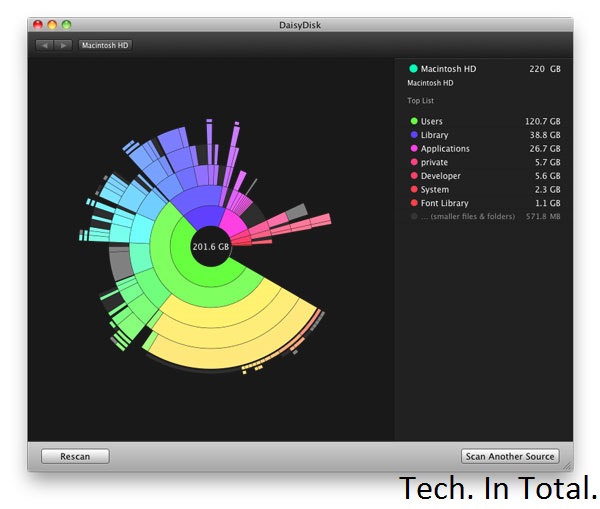
Whether your drive is in a computer or a mobile device, if it gets filled up you're probably going to lose some speed in the process. Although you may have a number of important files on that drive, there's still a bunch of stuff you can get rid of. On a desktop computer, the easiest way to find what's taking up a bunch of space is to use a disk space analyzer. Then you can use that information to figure out what to delete.
Most Android users can migrate data to a microSD card and call it a day, but if you're rooted you can use an app like SD Maid to clean things up automatically. If you're running iOS, you don't get an automatic method for cleanup but you can view what's taking up all that space. Head on over to the Settings app, tap General, and then tap Usage. You'll get a rundown of which apps are using how much space so you can delete them, or at least delete some of the data they're saving on your device.
9. Install a Custom ROM on Your Android

When Android 4.1 Jellybean is released (and actually on real devices), the OS' sluggishness might be a thing of the past. For those of us still running 4.0 or earlier and are bothered by speed issues, choosing a speed-optimized ROM can help remedy the issue. Speed is probably not the first priority of the ROM that comes with your device, so do a little research to see what's available and if you can flash something better.
8. Speed Up Dropbox's File Syncing Speeds

You can only upload as fast as your connection allows, but Dropbox—by default—limits your upload speeds no matter what. Instead of maximizing your connection, it automatically choices whatever speed it believes is optimal. You don't have to let Dropbox choose for you. You can limit it to any speed yourself, or remove that limit entirely:
On Windows, Click Dropbox in the system tray, then Preferences > Bandwidth; on Mac, click Dropbox in the menu bar, then Preferences > Network > Bandwidth > Change Settings. Once there, change your Upload rate to "Don't limit", or if you're familiar with your network's upload bandwidth and want to exercise a little more control, pick an upload limit that you're comfortable with in the Limit to field.
That's all there is to it.
7. Uninstall Unnecessary Apps

There's nothing wrong with a few apps on your computer, but when you're running a ton of them it can slow things down. If you need them you need them, but there are probably a few you don't. At the very least the apps are using your disk space, if not taking up additional resources, so it's good to audit your collection and uninstall what you don't need. Unsurprisingly, uninstallers can make this process a little easier for you. They give you a list of your apps and let you remove them with a few clicks. You still have to audit the list yourself, but it's a process that's much more simple than manual removal.
On mobile devices this isn't so much of an issue as both iOS and Android make it pretty simple to get rid of an app you don't want. Sometimes you end up with a lot of apps and aren't sure what you can get rid of.
6. Perform System Maintenance and Optimization

Modern operating systems perform maintenance tasks on their own, but these automated routines aren't perfect. It's a good idea to perform these tasks yourself on a monthly or bi-monthly basis. On Windows, CCleaner will get the job done. It works on OS X as well, but we prefer Onyx.
5. Speed Up Browsing Times by Optimizing Your DNS Settings

The amount of time you spend waiting for a site to load can be a bit faster if you're using the best DNS servers. The problem is, which servers you ought to be using will depend on your location. Namebench is a free utility for Windows, OS X, and Linux that'll run tests to figure that out for you so you can optimize your DNS settings. The test can take a little while to complete, so run it, take a break, and come back to better DNS server suggestions.
4. Install a Lightweight Operating System

Sometimes your computer is just old and any speed gains you can tweak out of it are not going to be worth your time. Instead, it's better to just say goodbye to the machine as you know it and give it a lightweight operating system it can run with ease. Which OS should you pick? some good ones for netbooks (which may do just as well for old machines), but generally that means some flavor of Linux. While that'll work for a lot of Tech. In Total. readers, it won't for everyone. If you'd rather stick with Windows, trim it down to the bare essentials. It may not be as fast as some of those tiny Linux distributions, but it'll be a lot faster than a feature-rich copy of Windows.
3. Boost Your Boot Time

You're probably not rebooting your computer with too much regularity, but that can make it all the more frustrating when you have to wait to see your desktop again. While booting up is always going to take a little while, you can speed it up. Windows users have a great tool called Soluto that helps you fix a number of issues that cause slow performance, including problems that affect boot times.
OS X users don't have such a nice solution, but OS X is pretty quick when it comes to the actual boot screen. More slowness occurs after you see the desktop and all the little things you have installed start to open. If you want to remedy that situation, just head into the System Preferences app, the Users and Groups preference pane, and click on your user. In the Login Items tab you'll have a list of all the stuff that you've set to run when you log in. If there's anything in there that you don't really want, just remove it from the list and your startup time will improve. Users of OS X Lion (or later) may also benefit from disabling the Resume feature, which restores your computer to its previous state as soon as you boot up. You can do this in the General preference pane in System Preferences by unchecking the box next to "Restore windows when quitting and re-opening apps."
2. Overclock Your Processor

If you literally want to speed up your computer, that's what overclocking can do for you. Some processor overclocking provides greater speed gains than others, so you'll want to do a little research before you jump right in. The process takes quite a bit of time, commitment, and care, so you don't want to bother if you're in for negligible speed gains. You can even overclock your video card, too.
1. Get an SSD

By now, it shouldn't come as a surprise that we think the SSD is the best upgrade you can get for your computer and now is a great time to buy one. When home for the holiday, I stopped in at Microcenter and found 120GB OCZ Vertex and Agility SSDs for under $100. I've seen online deals for even less from time to time. SSDs have never been more affordable and they can make a sluggish computer feel brand new. If you've been sitting on the fence about making the upgrade, now's a great time to make the change. Just know that you'll never go back.
Samsung’s new 75-inch TV has a big price tag to match

That 55-inch TV you've been watching Netflix on is starting to look awfully small, now that Samsung has taken the wraps off its new 75-inch 75ES9000. The set, now on sale in South Korea, packs more than just a massive LED-backlit display in its incredibly thin 7.9mm deep frame.
In addition to featuring common Smart TV apps such as Netflix and Twitter, the television includes built-in wifi and a video camera that can be used for video conferencing. The camera also lets you interact with the on-screen display using hand gestures, much like Microsoft's Kinect for the Xbox 360. In fact, you can even control the TV using your voice.
All of this screen real estate and the technology behind it comes at a pretty steep price. The 75ES9000 is selling for 19.8 million South Korean won, or approximately $17,442. If you're in the market for a TV — especially one you can get now, and for less than the price of a car.
Report: More fixes for overheating iPads?

Apple is quietly revising its third-generation iPad in a number of ways to fix an overheating issue with the tablet, according to Digitimes.
The Taiwanese tech site reported Friday that Apple is switching out the third-gen iPad's dual-LED backlight module for a single-LED module like the one used for the iPad 2. That report comes on the heels of a Digitimes report from a day earlier that claimed Apple was upgrading the battery in its new iPad, also to deal with the overheating problem.
Both reports cited unnamed sources in the Asian electronics supply chain. The rumored revisions to the third-gen iPad will appear in models made available around the holidays, Digitimes reported. The iPad's overheating issues have been well-documented. Days after Apple released its third-gen iPad, Dutch site Tweakers.net published thermal images that it said showed the new iPad running 10 degrees hotter than the iPad 2. Using an infrared camera, Tweakers measured the temperature of each tablet side by side after five minutes of running GLBenchmark and found that the new iPad hit 33.6 degrees centigrade (92.5 Fahrenheit) while the iPad 2 ran at a cooler 28.3 degrees centigrade (82.9 Fahrenheit). Apple told All Things D that the new iPad runs "well within our thermal specifications."
If Digitimes' sources are correct, Apple is tackling the overheating issue on several fronts. First, there's the reported revision to the battery, which would make the tablet "slightly lighter and thinner than previously designed," the site reported. The third-gen iPad's second LED is apparently also a contributing factor to the tablet running hotter than Apple would like. Luckily for the iPad maker, returning to the single module design "will not affect luminosity and clarity of Apple's Retina Ddsplay," according to Digitimes' sources. Finally, the touch-screen panel on the revised iPad will utilize Sharp's indium gallium zinc oxide (IGZO) panel technology, Digitimes said, citing the Chinese-language Apple Daily site. That will allow for a thinner profile for the revised tablet and, somehow, "longer battery life," according to Apple Daily. It would also mean Apple is switching from its current panel supplier, Samsung, to Sharp. As always, Apple product rumors should be taken with a grain of salt
Samsung said to be working on new, even bigger Galaxy Note

Sentiment over whether the mammoth screen on the original Galaxy Note (pictured above) seemed to be split between people who found it useful, and those who found it a bit excessive. Apparently not content with the 5.3-inch screen on its original smartphone/tablet hybrid, Samsung is reportedly poised to unveil the Galaxy Note 2, a device that manages to up the already enormous screen size to 5.5-inches.
The new Note is also said to feature a more powerful processor, as well as an improved camera, pushing past the original's 8.0-megapixel lens and landing closer to 12 or 13 megapixels. Of course, this means we'll have to yet again ask the question of whether we really need a smartphone with a tablet form factor, but given our own Taylor Hatmaker's enthusiastic response to the first Note, we're eager to see exactly how the Note 2 stacks up.
Samsung will supposedly reveal the new handset at the IFA consumer electronics show, which takes place in Germany this August. If this well-sourced information does indeed pan out, you can expect at least another year's worth of conjecture over whether a smartphone with a stylus is simply too much to handle.
Devices connected to internet set to reach 15 billion by 2015

Devices connected to theinternet will reach 15 billion by 2015 and later to 50 billion by 2020, Indian Institute of Technology, Hyderabad Director Professor U B Desai said today.
"Coming together of web technologies, mobile computer and communication technologies have greatly enhanced the capabilities of global reach even for the common man, opening several opportunities and possibilities for better living," he added, at a two-day national conference on 'Advanced Communication and Computer Technologies, organised by the Institution of Electronics and Telecommunication Engineers (IETE), Visakhapatnam centre at the National Science and Technological Laboratory (NSTL) here today.
IETE president R K Gupta highlighted the role played by his organisation in reducing the digital divide by bringing together students, practicing professionals and industry.
IETE chairman, Visakhpatnam centre and Director NSTL S V Ranga Rajan said that 110 papers were shortlisted out of 160 papers presented by delegates in the area of communication technologies, image processing, microwaves and antennas, embedded systems, radar and sonar signal processing and others.
"Coming together of web technologies, mobile computer and communication technologies have greatly enhanced the capabilities of global reach even for the common man, opening several opportunities and possibilities for better living," he added, at a two-day national conference on 'Advanced Communication and Computer Technologies, organised by the Institution of Electronics and Telecommunication Engineers (IETE), Visakhapatnam centre at the National Science and Technological Laboratory (NSTL) here today.
IETE president R K Gupta highlighted the role played by his organisation in reducing the digital divide by bringing together students, practicing professionals and industry.
IETE chairman, Visakhpatnam centre and Director NSTL S V Ranga Rajan said that 110 papers were shortlisted out of 160 papers presented by delegates in the area of communication technologies, image processing, microwaves and antennas, embedded systems, radar and sonar signal processing and others.
Popular Posts
-
 It's been about three years since Microsoft unveiled a new version of Office, and particularly with Windows 8 just months away from ...
 -
 There's general agreement that Sony stumbled out of the gate with the PlayStation 3. Months of intense hype were followed by a la...
 -
 Latest Windows Phone 8 rumor suggests that current Windows Phone devices will receive the update Microsoft has yet to come forward wi...
 -
Microsoft is holding an invitation-only press event in San Francisco today at which it is expected to debut the next version of its...
-
 Gaming & Gadgets Microsoft kick-started the "next-generation" of gaming on November 22, 2005, when the company release...

